使用 AI Toolkit Copilot 工具進行 AI 代理開發
AI Toolkit Copilot 工具可幫助您更快地構建 AI 代理應用程式。這些工具提供現成的功能、模板和最佳實踐。您可以更快地建立使用 AI 的智慧應用程式。
AI Toolkit Copilot 工具使用 VS Code 的 語言模型工具 API。這些工具透過特定領域的聊天功能來擴充套件大型語言模型 (LLM)。在代理模式下,VS Code 可以自動使用這些工具來處理使用者提示和執行任務。
AI Toolkit Copilot 工具包含四個主要工具
- 代理程式碼生成
- AI 模型指南
- 評估程式碼生成
- 跟蹤程式碼生成
先決條件
- Visual Studio Code - 支援 MCP 伺服器開發的最新版本。
- GitHub Copilot Visual Studio Code 擴充套件
- GitHub Copilot Chat Visual Studio Code 擴充套件
- AI Toolkit Visual Studio Code 擴充套件
在 AI Toolkit 中使用 Copilot 工具
安裝完先決條件後,您可以在聊天中使用代理時使用 AI Toolkit 提供的工具。
-
開啟“聊天”檢視,按下 ⌃⌘I (Windows、Linux Ctrl+Alt+I),然後從下拉列表中選擇“代理”。
-
選擇“工具”按鈕可檢視可用工具列表。
您可以選擇或取消選擇要使用的工具。您也可以透過在搜尋框中鍵入來搜尋工具。
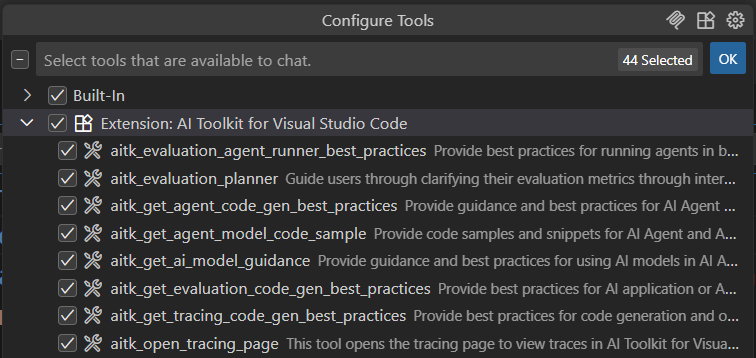
代理程式碼生成工具
代理程式碼生成工具可幫助開發人員更輕鬆地建立代理程式碼。使用此工具可快速生成適用於 AI 代理的程式碼片段和模板。這種方法可以加快開發速度,並確保您的程式碼遵循 AI 代理開發的最佳實踐。
代理程式碼生成工具的主要功能
代理程式碼生成工具具有幾個重要功能
-
智慧代理程式碼生成: 該工具可根據您的需求生成代理程式碼。
-
預設框架選擇: 如果您不選擇框架,該工具將為您選擇 Microsoft Agent Framework SDK。
示例需求
Create an AI app that helps me to manage travel queries. -
整合模型指導: 該工具使用“AI 模型指南”在構建代理時為您提供模型詳細資訊。除非您另有選擇,否則它將選擇 GPT4.1 作為預設模型。
示例需求
Create an AI app to manage travel queries, use Microsoft Foundry models. -
支援各種代理框架功能: 該工具支援許多框架功能,如函式呼叫、MCP 和流式響應。
示例需求
Create an AI app to check the CNN headline, use local MCP playwright to fetch CNN web page. -
工作流支援: 該工具支援 Agent Framework 中的許多工作流,如順序、Switch-case、Loop 和 Human-In-The-Loop。
示例需求
Build a conditional routing workflow based on email classification:
 - "Email Classifier": determines if email is spam or legitimate.
 - "Spam Handler": processes spam emails (if spam detected).
 - "Email Assistant": drafts responses for legitimate emails (if not spam).
AI 模型指南工具
AI 模型指南工具可幫助開發人員為其應用程式選擇最佳 AI 模型。它推薦 Microsoft Foundry 和 GitHub 模型,包括最新和最受歡迎的模型。該工具提供詳細資訊,如輸入型別、上下文長度、成本和指標(質量、速度、安全性)。它還解釋瞭如何連線到模型,例如 GitHub 端點和令牌。
此工具支援
-
基本模型推薦
示例資訊提示
Which models are specifically designed for reasoning or math tasks?在此示例中,Copilot 從此工具收集模型資訊,並推薦 o 系列模型用於推理或數學任務。
-
與程式碼生成工具協同工作,在代理程式碼生成期間提供模型選擇
示例需求提示
Create a quick demo AI Chat app在此示例中,Copilot 為聊天應用選擇了一個模型,如免費的 GitHub GPT-4.1。
-
基於特定需求的模型選擇
示例需求提示
Create an AI app to manage travel queries using a cheap and fast azure model.在此示例中,Copilot 選擇了一個模型,如 MicrosoftFoundry GPT-4.1-mini 模型。
評估程式碼生成工具
評估程式碼生成工具可幫助您為 AI 應用程式或代理新增評估。它使用 Plan 工具收集詳細資訊並準備資產,然後生成程式碼。
評估程式碼生成工具的主要功能
評估程式碼生成工具具有四個主要功能
- 分析和指標建議: 審查您的 AI 應用程式並建議最佳測試。
- 合成查詢生成: 根據您的測試目標建立測試問題。
- 批次應用程式執行: 使用測試問題多次執行您的應用程式並收集結果。
- 評估程式碼生成: 使用 Azure AI Eval SDK 生成測試程式碼。
無論您的技能水平如何,這些工具都很有用。新開發人員可以獲得有關測試和工具的指導,而經驗豐富的開發人員可以節省時間。Plan 工具可以查詢您的測試檔案或詢問它們的位置,從而輕鬆地將測試新增到您的應用程式中。
示例需求提示
-
示例 1
Create an evaluation for my AI travel assistant application that assesses response accuracy and user satisfaction. -
示例 2
Measure the tool call accuracy of the agent.
跟蹤程式碼生成工具
跟蹤程式碼生成工具分享了為 AI 應用程式新增跟蹤的最佳實踐。它可幫助開發人員輕鬆監視和除錯 AI 代理和工作流。此工具支援以下語言和 SDK 的本地跟蹤:
- (Python) agent-framework, azure-ai-inference, azure-ai-agents, azure-ai-projects, openai, openai-agents, langchain, google-genai, anthropic
- (JS/TS) azure-ai-inference, azure-ai-projects, openai, langchain, anthropic
示例需求提示
Enable tracing for my AI travel assistant application built with the agent-framework SDK in Python.
您學到了什麼
在本文中,您學習瞭如何
- 使用 AI 工具加速應用程式開發。
- 新增跟蹤以監視和除錯您的 AI 應用程式。
- 為您的任務選擇最佳 AI 模型。
- 將評估和測試納入您的 AI 工作流。