程式化語言功能
程式化語言功能是一套由 vscode.languages.* API 驅動的智慧編輯功能。在 Visual Studio Code 中提供動態語言功能有兩種常用方式。我們以 懸停 (Hover) 為例
vscode.languages.registerHoverProvider('javascript', {
  provideHover(document, position, token) {
    return {
      contents: ['Hover Content']
    };
  }
});
如上所示,vscode.languages.registerHoverProvider API 提供了一種簡單的方式來為 JavaScript 檔案提供懸停內容。當您的擴充套件啟用後,每當您將滑鼠懸停在某些 JavaScript 程式碼上時,VS Code 就會查詢所有 JavaScript 的 HoverProvider,並在一個懸停小部件中顯示結果。下面的 語言功能列表 和圖示 GIF 提供了一種簡單的方式,讓您能夠定位您的擴充套件需要哪個 VS Code API / LSP 方法。
另一種方法是實現一個支援 語言伺服器協議 (Language Server Protocol) 的語言伺服器。其工作方式是
- 擴充套件程式為 JavaScript 提供了一個語言客戶端和一個語言伺服器。
- 語言客戶端與任何其他 VS Code 擴充套件一樣,在 Node.js 擴充套件主機上下文中執行。當它啟用時,它會在另一個程序中啟動語言伺服器,並透過 語言伺服器協議 與其通訊。
- 您在 VS Code 中懸停在 JavaScript 程式碼上
- VS Code 通知語言客戶端有關懸停的資訊
- 語言客戶端查詢語言伺服器以獲取懸停結果,並將其傳送回 VS Code
- VS Code 在懸停小部件中顯示懸停結果
這個過程看起來更復雜,但它提供了兩個主要好處
- 語言伺服器可以用任何語言編寫
- 語言伺服器可以被重用,為多個編輯器提供智慧編輯功能
要獲得更深入的指南,請訪問 語言伺服器擴充套件指南。
語言功能列表
此列表包含每種語言功能的以下專案
- VS Code 中語言功能的插圖
- 相關的 VS Code API
- 相關的 LSP 方法
提供診斷資訊
診斷資訊是一種指示程式碼問題的方法。

語言伺服器協議
您的語言伺服器將 textDocument/publishDiagnostics 訊息傳送到語言客戶端。該訊息包含一個資源 URI 的診斷項陣列。
注意:客戶端不會向伺服器請求診斷資訊。伺服器會將診斷資訊推送到客戶端。
直接實現
let diagnosticCollection: vscode.DiagnosticCollection;

export function activate(ctx: vscode.ExtensionContext): void {
  ...
  ctx.subscriptions.push(getDisposable());
  diagnosticCollection = vscode.languages.createDiagnosticCollection('go');
  ctx.subscriptions.push(diagnosticCollection);
  ...
}

function onChange() {
  let uri = document.uri;
  check(uri.fsPath, goConfig).then(errors => {
    diagnosticCollection.clear();
    let diagnosticMap: Map<string, vscode.Diagnostic[]> = new Map();
    errors.forEach(error => {
      let canonicalFile = vscode.Uri.file(error.file).toString();
      let range = new vscode.Range(error.line-1, error.startColumn, error.line-1, error.endColumn);
      let diagnostics = diagnosticMap.get(canonicalFile);
      if (!diagnostics) { diagnostics = []; }
      diagnostics.push(new vscode.Diagnostic(range, error.msg, error.severity));
      diagnosticMap.set(canonicalFile, diagnostics);
    });
    diagnosticMap.forEach((diags, file) => {
      diagnosticCollection.set(vscode.Uri.parse(file), diags);
    });
  })
}
基本
報告已開啟編輯器的診斷資訊。最少,這需要在每次儲存時發生。更好的是,應根據編輯器未儲存的內容來計算診斷資訊。
高階
不僅為已開啟的編輯器報告診斷資訊,還為已開啟資料夾中的所有資源報告診斷資訊,無論它們是否曾經在編輯器中開啟過。
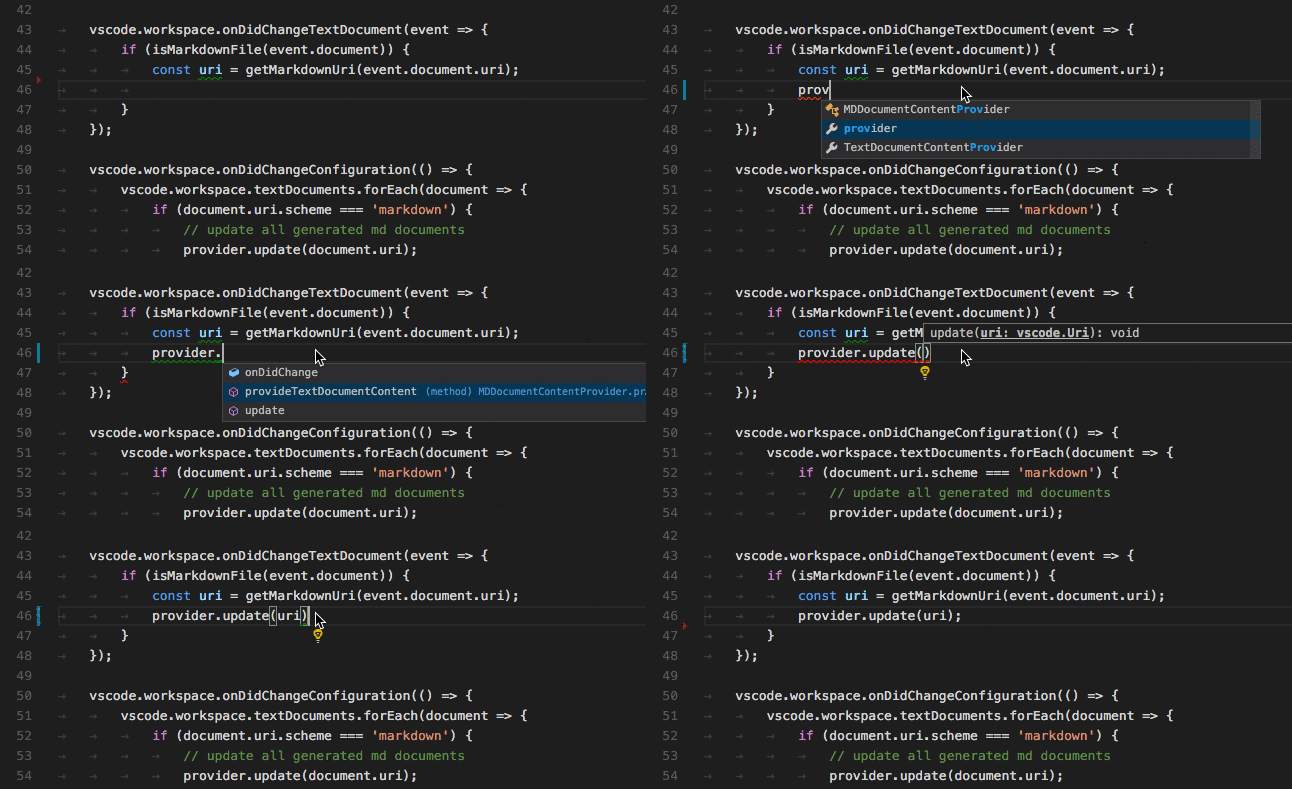
顯示程式碼補全建議
程式碼補全提供上下文相關的建議給使用者。
語言伺服器協議
在響應 initialize 方法時,您的語言伺服器需要宣告它提供補全功能,以及是否支援 completionItem\resolve 方法來為計算出的補全項提供額外資訊。
{
    ...
    "capabilities" : {
        "completionProvider" : {
            "resolveProvider": "true",
            "triggerCharacters": [ '.' ]
        }
        ...
    }
}
直接實現
class GoCompletionItemProvider implements vscode.CompletionItemProvider {
    public provideCompletionItems(
        document: vscode.TextDocument, position: vscode.Position, token: vscode.CancellationToken):
        Thenable<vscode.CompletionItem[]> {
    ...
    }
}

export function activate(ctx: vscode.ExtensionContext): void {
    ...
    ctx.subscriptions.push(getDisposable());
    ctx.subscriptions.push(
        vscode.languages.registerCompletionItemProvider(
            GO_MODE, new GoCompletionItemProvider(), '.', '\"'));
    ...
}
基本
您不支援解析提供程式。
高階
您支援解析提供程式,該程式會計算使用者選擇的補全建議的額外資訊。這些資訊會與選定的項一起顯示。
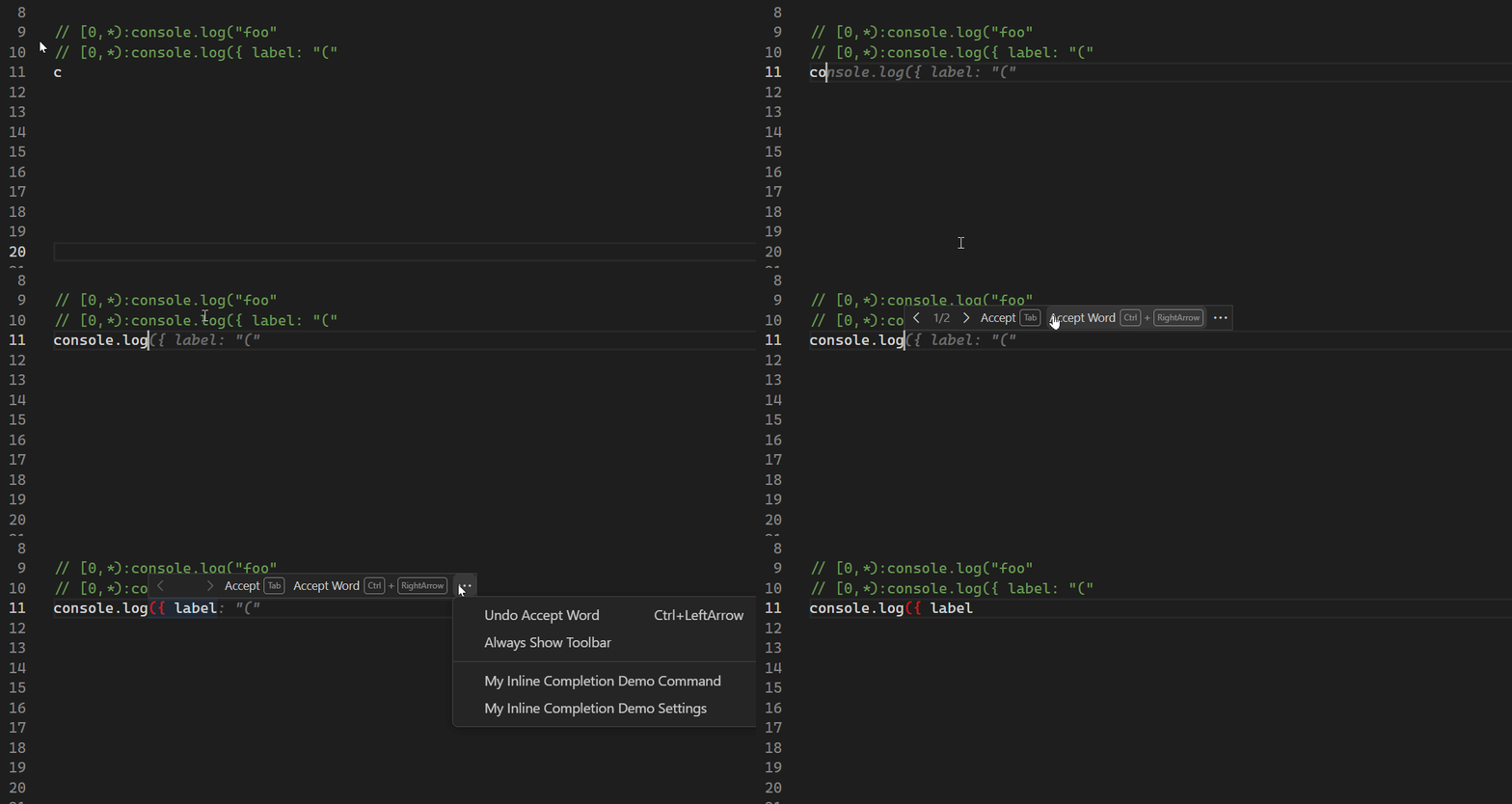
顯示內聯補全
內聯補全直接在編輯器中顯示多標記建議(幽靈文字)。
直接實現
vscode.languages.registerInlineCompletionItemProvider({ language: 'javascript' }, {
    provideInlineCompletionItems(document, position, context, token) {
        const result: vscode.InlineCompletionList = {
            items: [],
            commands: [],
        };

        ...

        return result;
    }
});
您可以在 內聯補全示例擴充套件 中探索完整的示例。
基本
僅為基於當前行內容、特定語言的已知模式列表返回內聯補全。
高階
根據整個文件或工作區的內容以及更復雜的模式返回內聯補全。
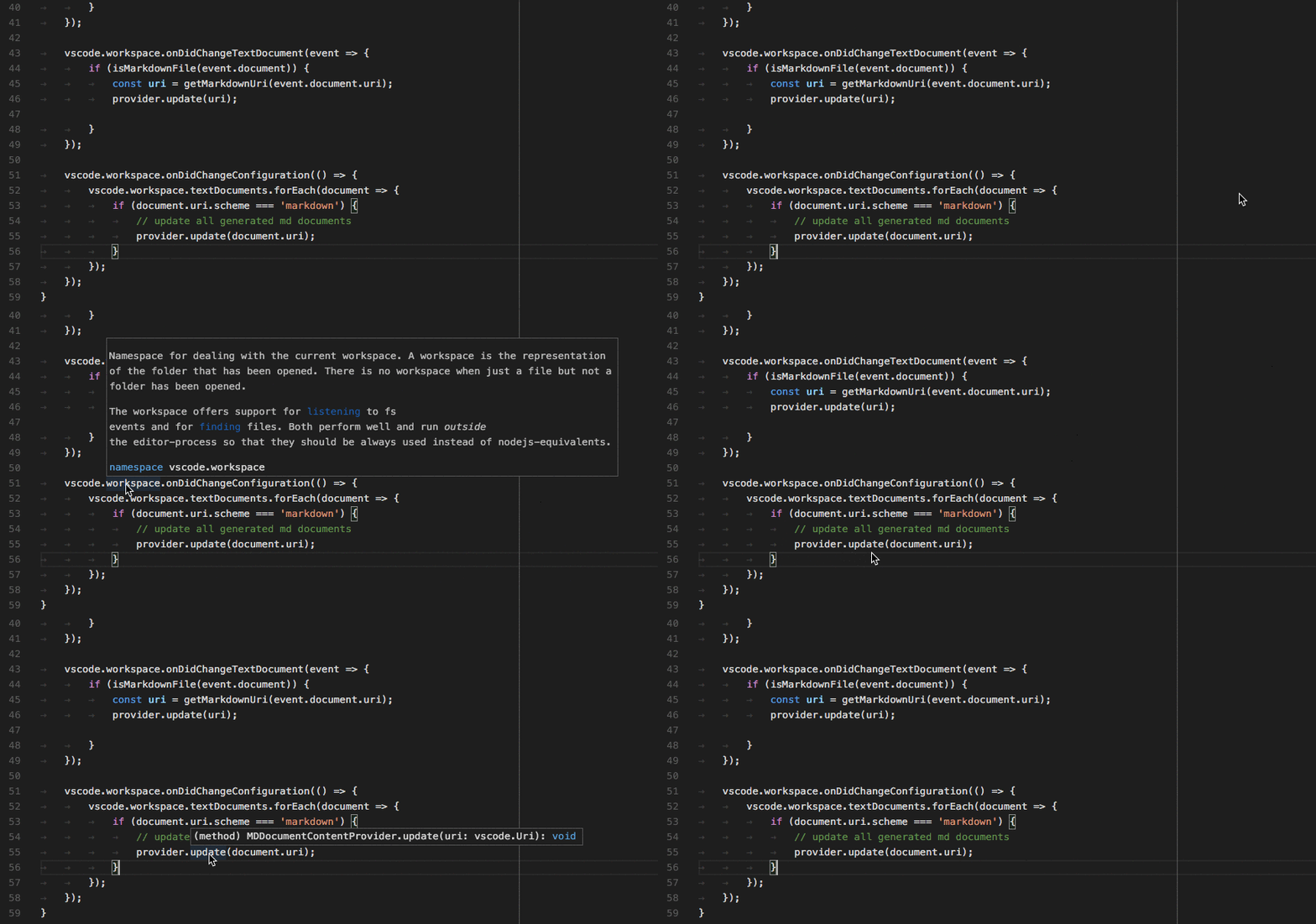
顯示懸停資訊
懸停顯示滑鼠指標下方符號/物件的資訊。這通常是符號的型別和描述。
語言伺服器協議
在響應 initialize 方法時,您的語言伺服器需要宣告它提供懸停功能。
{
    ...
    "capabilities" : {
        "hoverProvider" : "true",
        ...
    }
}
此外,您的語言伺服器需要響應 textDocument/hover 請求。
直接實現
class GoHoverProvider implements HoverProvider {
    public provideHover(
        document: TextDocument, position: Position, token: CancellationToken):
        Thenable<Hover> {
    ...
    }
}

export function activate(ctx: vscode.ExtensionContext): void {
    ...
    ctx.subscriptions.push(
        vscode.languages.registerHoverProvider(
            GO_MODE, new GoHoverProvider()));
    ...
}
基本
顯示型別資訊,並在可用時包含文件。
高階
以與程式碼著色相同的樣式對方法簽名進行著色。
函式和方法簽名幫助
當用戶輸入函式或方法時,顯示正在呼叫的函式/方法的有關資訊。

語言伺服器協議
在響應 initialize 方法時,您的語言伺服器需要宣告它提供簽名幫助功能。
{
    ...
    "capabilities" : {
        "signatureHelpProvider" : {
            "triggerCharacters": [ '(' ]
        }
        ...
    }
}
此外,您的語言伺服器需要響應 textDocument/signatureHelp 請求。
直接實現
class GoSignatureHelpProvider implements SignatureHelpProvider {
    public provideSignatureHelp(
        document: TextDocument, position: Position, token: CancellationToken):
        Promise<SignatureHelp> {
    ...
    }
}

export function activate(ctx: vscode.ExtensionContext): void {
    ...
    ctx.subscriptions.push(
        vscode.languages.registerSignatureHelpProvider(
            GO_MODE, new GoSignatureHelpProvider(), '(', ','));
    ...
}
基本
確保簽名幫助包含函式或方法的引數的文件。
高階
無其他。
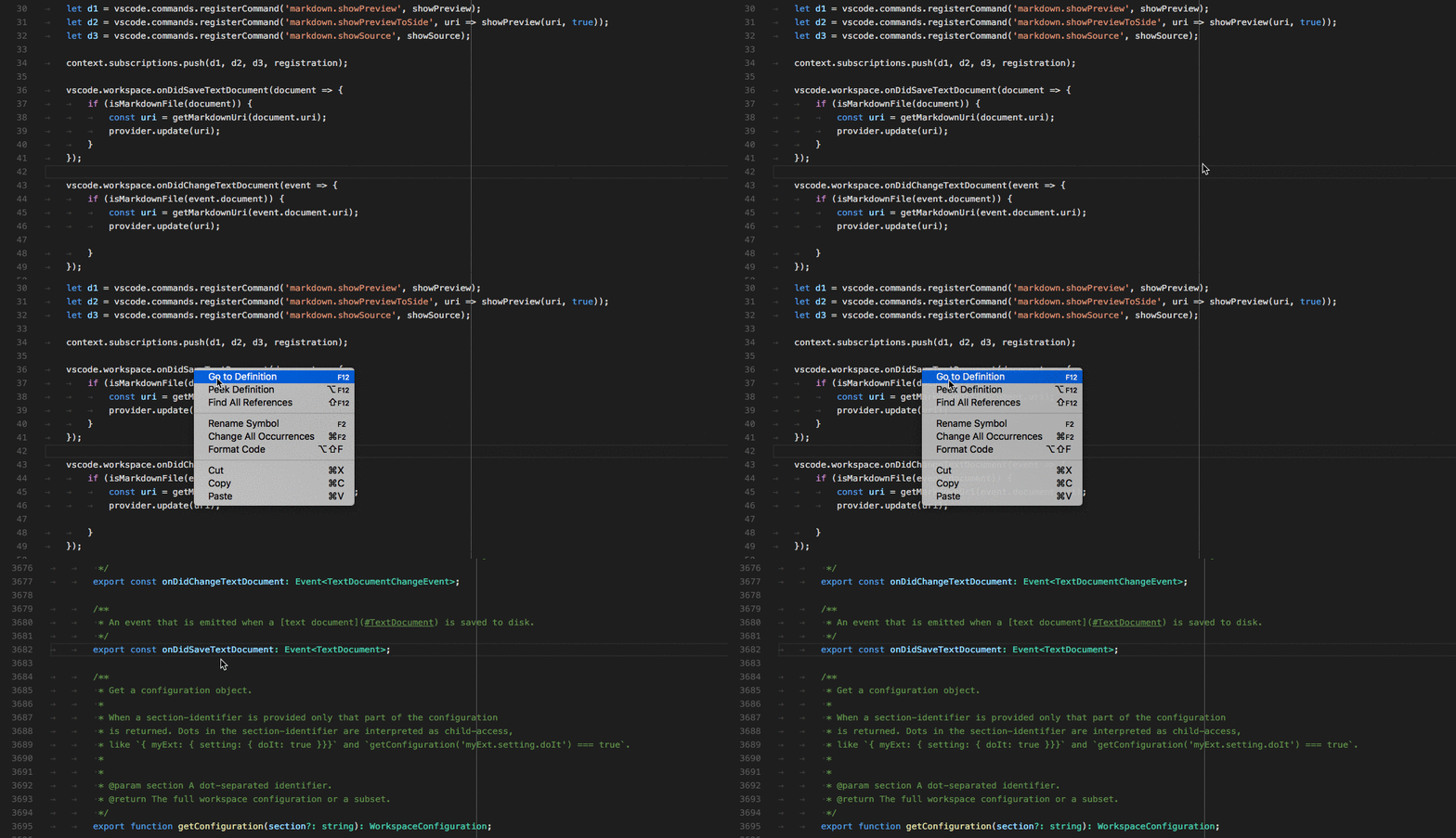
顯示符號定義
允許使用者在變數/函式/方法的使用位置直接檢視其定義。
語言伺服器協議
在響應 initialize 方法時,您的語言伺服器需要宣告它提供轉到定義位置的功能。
{
    ...
    "capabilities" : {
        "definitionProvider" : "true"
        ...
    }
}
此外,您的語言伺服器需要響應 textDocument/definition 請求。
直接實現
class GoDefinitionProvider implements vscode.DefinitionProvider {
    public provideDefinition(
        document: vscode.TextDocument, position: vscode.Position, token: vscode.CancellationToken):
        Thenable<vscode.Location> {
    ...
    }
}

export function activate(ctx: vscode.ExtensionContext): void {
    ...
    ctx.subscriptions.push(
        vscode.languages.registerDefinitionProvider(
            GO_MODE, new GoDefinitionProvider()));
    ...
}
基本
如果一個符號模稜兩可,您可以顯示多個定義。
高階
無其他。
查詢符號的所有引用
允許使用者檢視某個變數/函式/方法/符號被使用的所有原始碼位置。
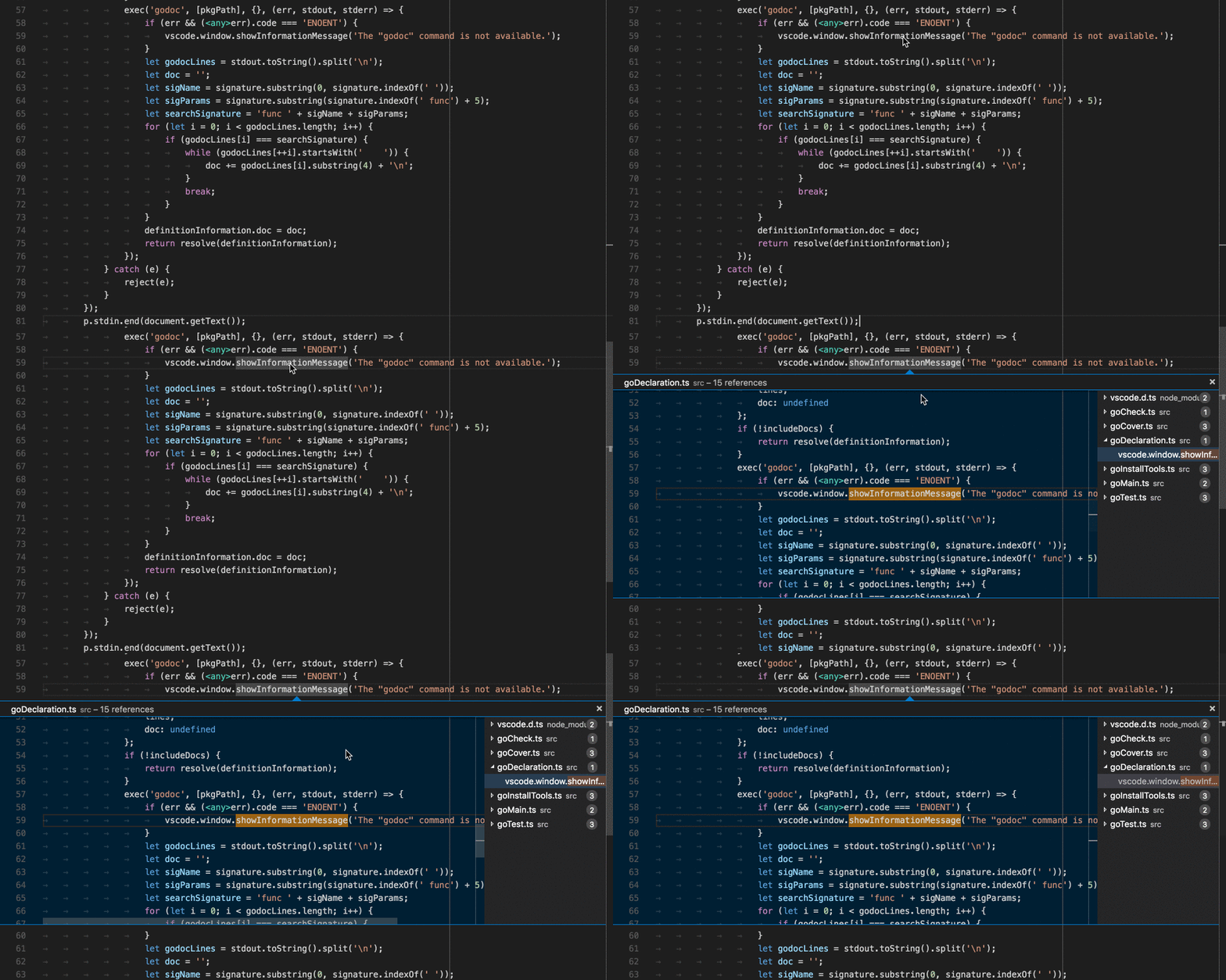
語言伺服器協議
在響應 initialize 方法時,您的語言伺服器需要宣告它提供符號引用位置的功能。
{
    ...
    "capabilities" : {
        "referencesProvider" : "true"
        ...
    }
}
此外,您的語言伺服器需要響應 textDocument/references 請求。
直接實現
class GoReferenceProvider implements vscode.ReferenceProvider {
    public provideReferences(
        document: vscode.TextDocument, position: vscode.Position,
        options: { includeDeclaration: boolean }, token: vscode.CancellationToken):
        Thenable<vscode.Location[]> {
    ...
    }
}

export function activate(ctx: vscode.ExtensionContext): void {
    ...
    ctx.subscriptions.push(
        vscode.languages.registerReferenceProvider(
            GO_MODE, new GoReferenceProvider()));
    ...
}
基本
返回所有引用的位置(資源 URI 和範圍)。
高階
無其他。
高亮顯示文件中符號的所有出現之處
允許使用者檢視已開啟編輯器中符號的所有出現之處。
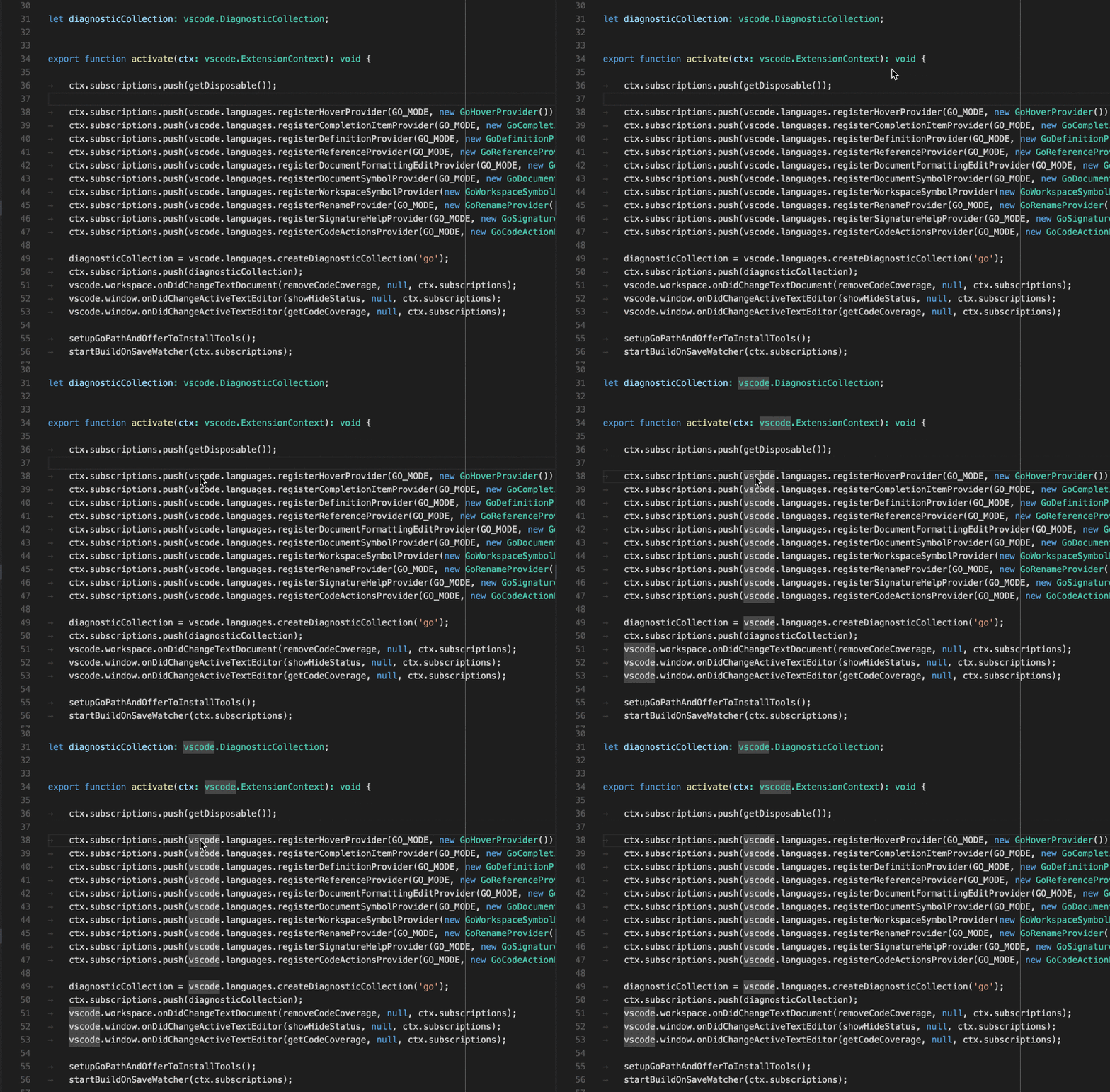
語言伺服器協議
在響應 initialize 方法時,您的語言伺服器需要宣告它提供符號文件位置的功能。
{
    ...
    "capabilities" : {
        "documentHighlightProvider" : "true"
        ...
    }
}
此外,您的語言伺服器需要響應 textDocument/documentHighlight 請求。
直接實現
class GoDocumentHighlightProvider implements vscode.DocumentHighlightProvider {
    public provideDocumentHighlights(
        document: vscode.TextDocument, position: vscode.Position, token: vscode.CancellationToken):
        vscode.DocumentHighlight[] | Thenable<vscode.DocumentHighlight[]>;
    ...
    }
}

export function activate(ctx: vscode.ExtensionContext): void {
    ...
    ctx.subscriptions.push(
        vscode.languages.registerDocumentHighlightProvider(
            GO_MODE, new GoDocumentHighlightProvider()));
    ...
}
基本
您返回編輯器文件中找到引用的範圍。
高階
無其他。
顯示文件中的所有符號定義
允許使用者快速導航到已開啟編輯器中的任何符號定義。
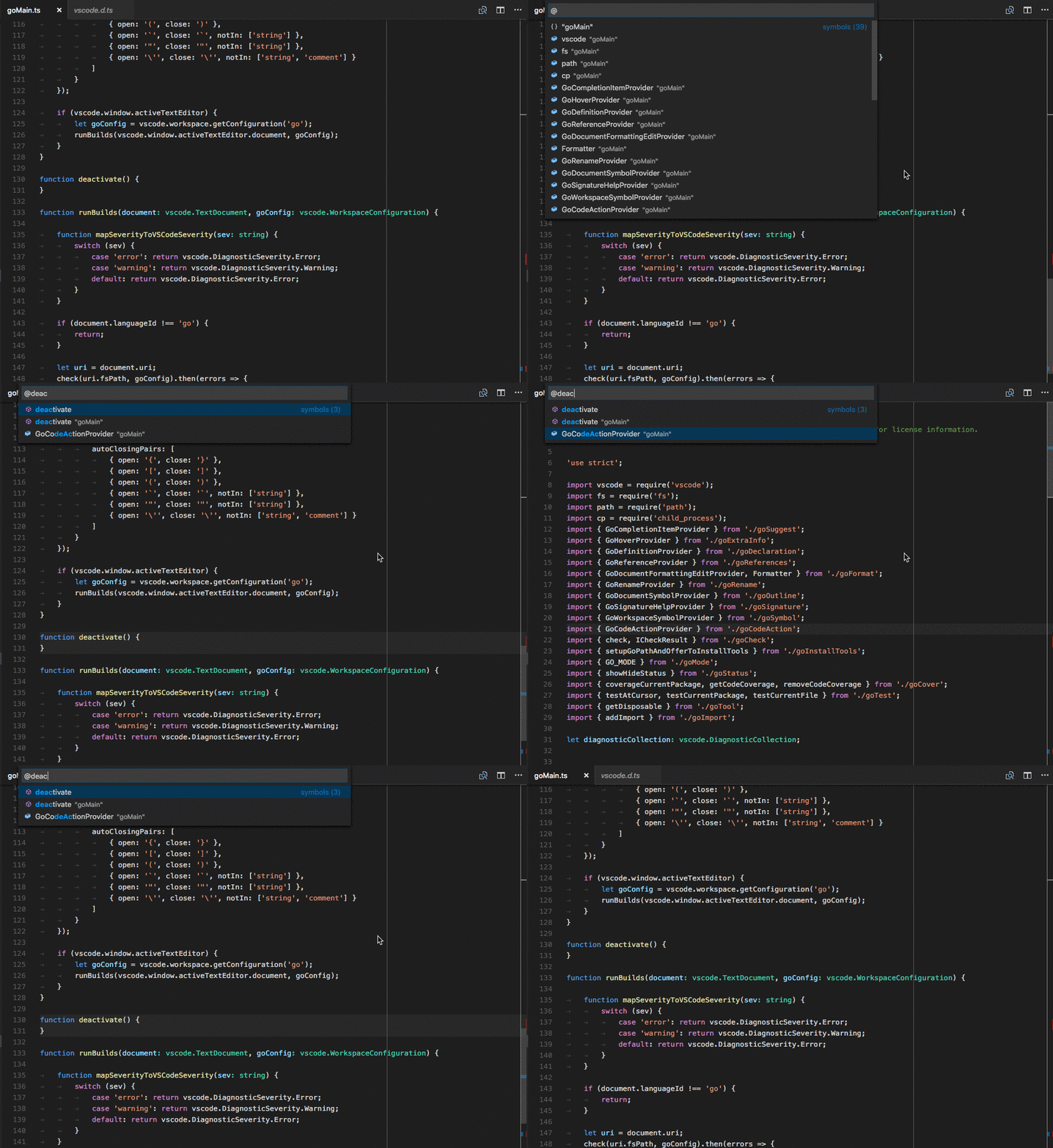
語言伺服器協議
在響應 initialize 方法時,您的語言伺服器需要宣告它提供符號文件位置的功能。
{
    ...
    "capabilities" : {
        "documentSymbolProvider" : "true"
        ...
    }
}
此外,您的語言伺服器需要響應 textDocument/documentSymbol 請求。
直接實現
class GoDocumentSymbolProvider implements vscode.DocumentSymbolProvider {
    public provideDocumentSymbols(
        document: vscode.TextDocument, token: vscode.CancellationToken):
        Thenable<vscode.SymbolInformation[]> {
    ...
    }
}

export function activate(ctx: vscode.ExtensionContext): void {
    ...
    ctx.subscriptions.push(
        vscode.languages.registerDocumentSymbolProvider(
            GO_MODE, new GoDocumentSymbolProvider()));
    ...
}
基本
返回文件中的所有符號。定義符號的種類,如變數、函式、類、方法等。
高階
無其他。
顯示資料夾中的所有符號定義
允許使用者快速導航到 VS Code 中開啟的資料夾(工作區)內的任何位置的符號定義。
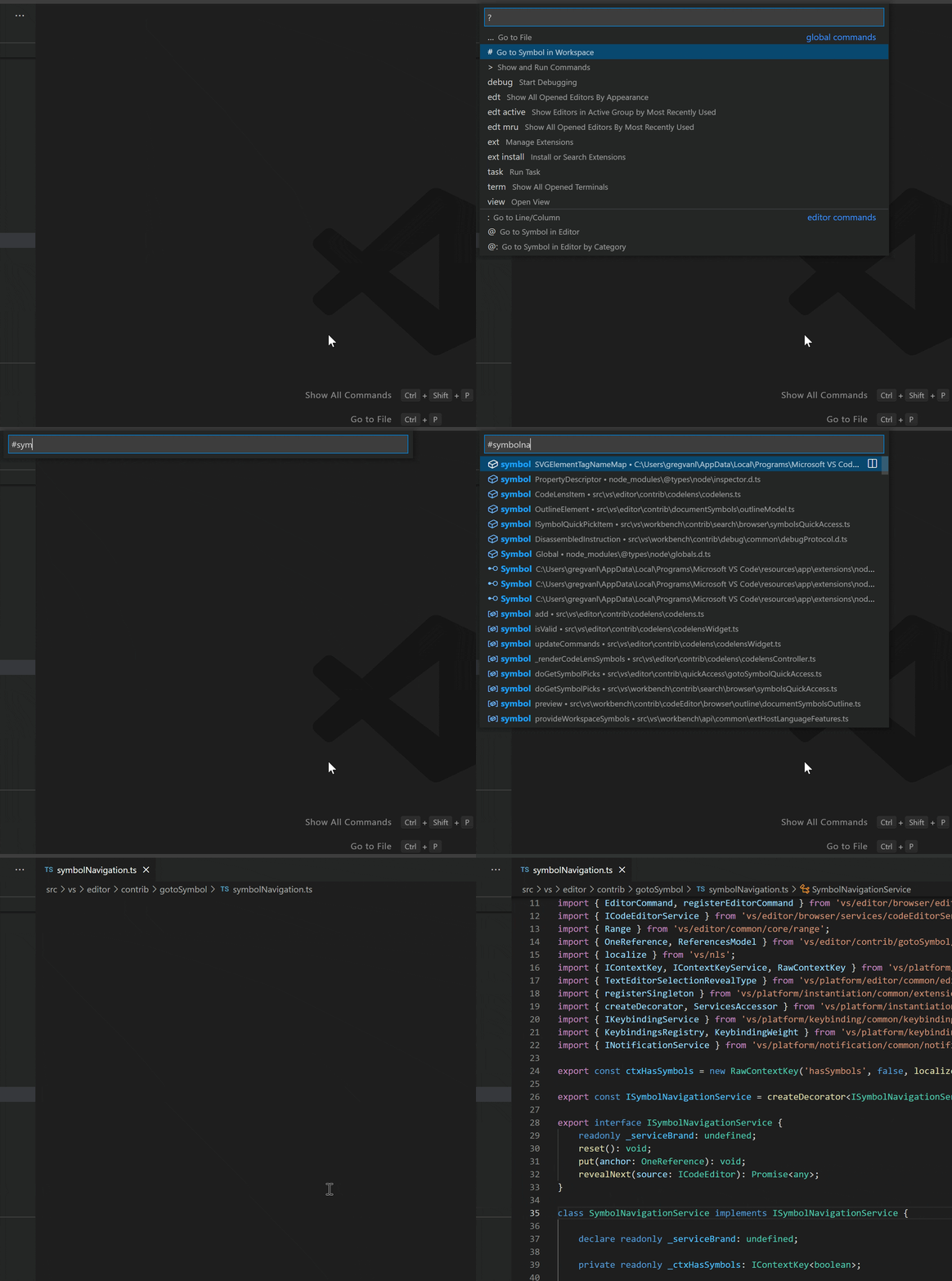
語言伺服器協議
在響應 initialize 方法時,您的語言伺服器需要宣告它提供全域性符號位置的功能。
{
    ...
    "capabilities" : {
        "workspaceSymbolProvider" : "true"
        ...
    }
}
此外,您的語言伺服器需要響應 workspace/symbol 請求。
直接實現
class GoWorkspaceSymbolProvider implements vscode.WorkspaceSymbolProvider {
    public provideWorkspaceSymbols(
        query: string, token: vscode.CancellationToken):
        Thenable<vscode.SymbolInformation[]> {
    ...
    }
}

export function activate(ctx: vscode.ExtensionContext): void {
    ...
    ctx.subscriptions.push(
        vscode.languages.registerWorkspaceSymbolProvider(
            new GoWorkspaceSymbolProvider()));
    ...
}
基本
返回開啟的資料夾中原始碼定義的所有符號。定義符號的種類,如變數、函式、類、方法等。
高階
無其他。
錯誤或警告的可能操作
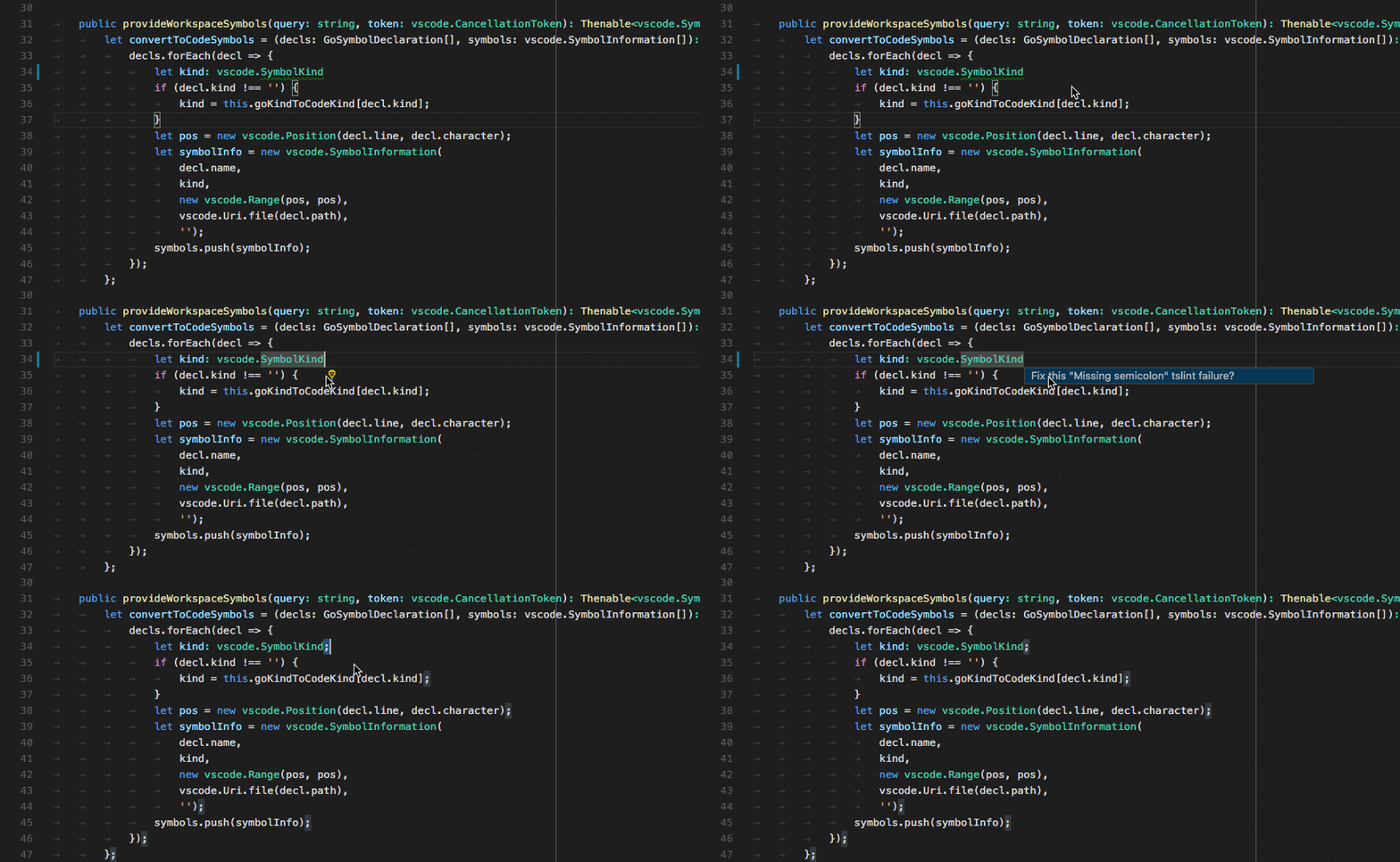
在錯誤或警告旁邊向用戶提供可能的糾正操作。如果操作可用,錯誤或警告旁邊會出現一個燈泡。當用戶點選燈泡時,會顯示一個可用程式碼操作列表。
語言伺服器協議
在響應 initialize 方法時,您的語言伺服器需要宣告它提供程式碼操作功能。
{
    ...
    "capabilities" : {
        "codeActionProvider" : "true"
        ...
    }
}
此外,您的語言伺服器需要響應 textDocument/codeAction 請求。
直接實現
class GoCodeActionProvider implements vscode.CodeActionProvider<vscode.CodeAction> {
    public provideCodeActions(
        document: vscode.TextDocument, range: vscode.Range | vscode.Selection,
        context: vscode.CodeActionContext, token: vscode.CancellationToken):
        Thenable<vscode.CodeAction[]> {
    ...
    }
}

export function activate(ctx: vscode.ExtensionContext): void {
    ...
    ctx.subscriptions.push(
        vscode.languages.registerCodeActionsProvider(
            GO_MODE, new GoCodeActionProvider()));
    ...
}
基本
為錯誤/警告糾正操作提供程式碼操作。
高階
此外,還提供原始碼操作,例如重構。例如,提取方法。
CodeLens - 在原始碼中顯示可操作的上下文資訊
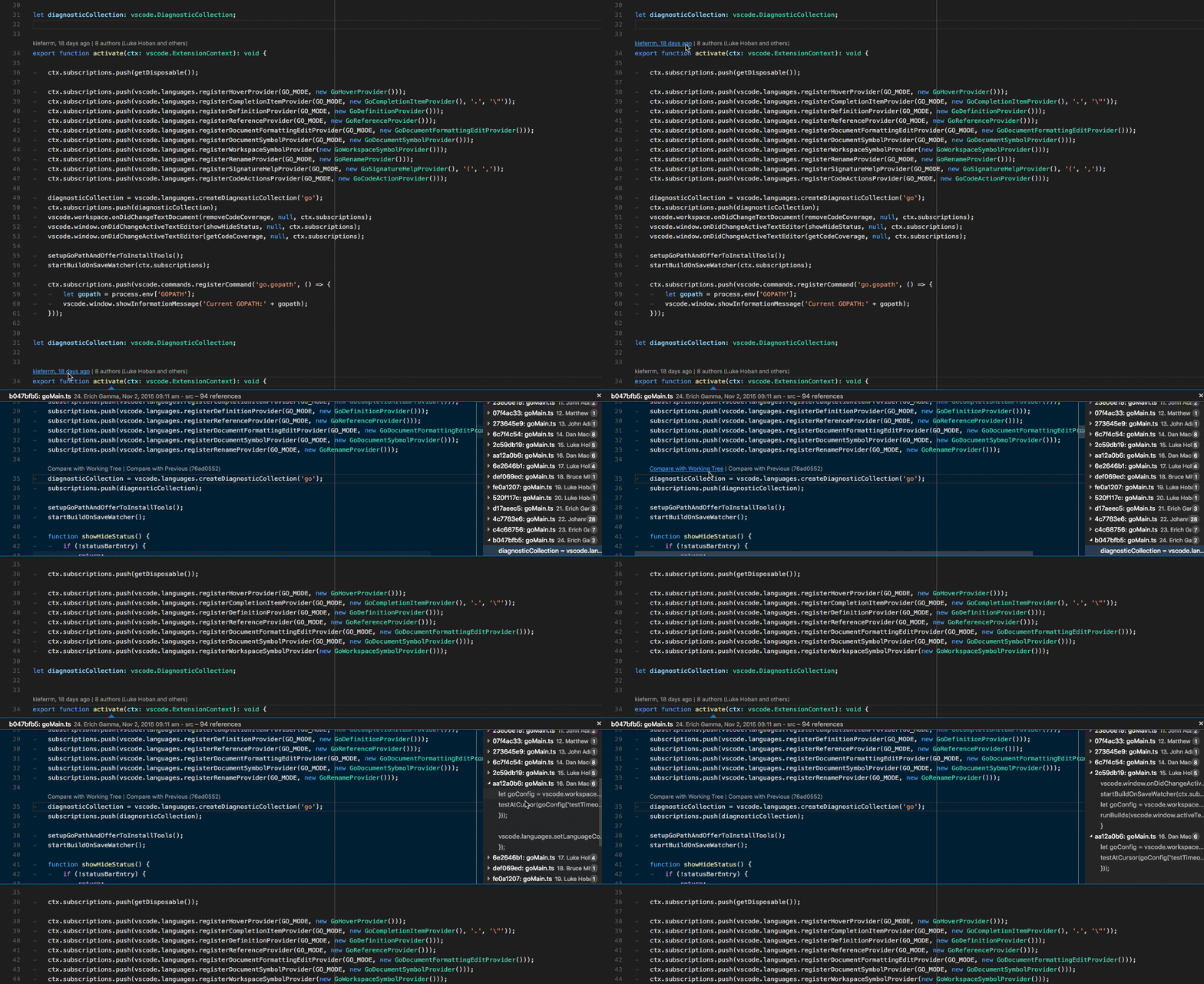
向用戶提供可操作的、上下文相關的資訊,這些資訊會穿插顯示在原始碼中。
語言伺服器協議
在響應 initialize 方法時,您的語言伺服器需要宣告它提供 CodeLens 結果,以及是否支援 codeLens\resolve 方法將 CodeLens 繫結到其命令。
{
    ...
    "capabilities" : {
        "codeLensProvider" : {
            "resolveProvider": "true"
        }
        ...
    }
}
此外,您的語言伺服器需要響應 textDocument/codeLens 請求。
直接實現
class GoCodeLensProvider implements vscode.CodeLensProvider {
    public provideCodeLenses(document: TextDocument, token: CancellationToken):
        CodeLens[] | Thenable<CodeLens[]> {
    ...
    }

    public resolveCodeLens?(codeLens: CodeLens, token: CancellationToken):
         CodeLens | Thenable<CodeLens> {
    ...
    }
}

export function activate(ctx: vscode.ExtensionContext): void {
    ...
    ctx.subscriptions.push(
        vscode.languages.registerCodeLensProvider(
            GO_MODE, new GoCodeLensProvider()));
    ...
}
基本
定義文件可用的 CodeLens 結果。
高階
透過響應
codeLens/resolve將 CodeLens 結果繫結到命令。
顯示顏色裝飾器
允許使用者在文件中預覽和修改顏色。

語言伺服器協議
在響應 initialize 方法時,您的語言伺服器需要宣告它提供顏色資訊。
{
    ...
    "capabilities" : {
        "colorProvider" : "true"
        ...
    }
}
此外,您的語言伺服器需要響應 textDocument/documentColor 和 textDocument/colorPresentation 請求。
直接實現
class GoColorProvider implements vscode.DocumentColorProvider {
    public provideDocumentColors(
        document: vscode.TextDocument, token: vscode.CancellationToken):
        Thenable<vscode.ColorInformation[]> {
    ...
    }
    public provideColorPresentations(
        color: Color, context: { document: TextDocument, range: Range }, token: vscode.CancellationToken):
        Thenable<vscode.ColorPresentation[]> {
    ...
    }
}

export function activate(ctx: vscode.ExtensionContext): void {
    ...
    ctx.subscriptions.push(
        vscode.languages.registerColorProvider(
            GO_MODE, new GoColorProvider()));
    ...
}
基本
返回文件中的所有顏色引用。提供所支援的顏色格式(例如 rgb(...)、hsl(...))的顏色演示。
高階
無其他。
格式化編輯器中的原始碼
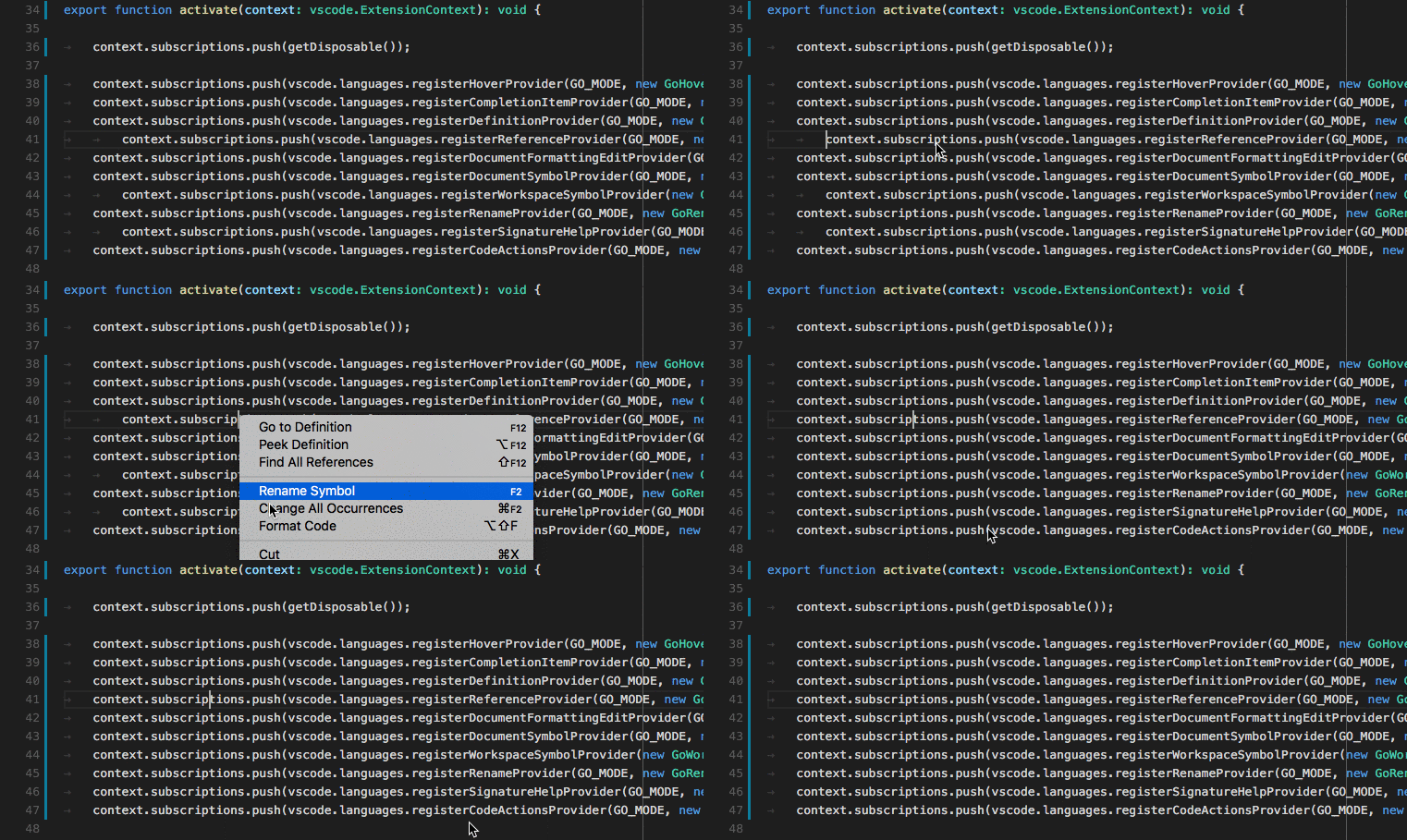
為使用者提供格式化整個文件的支援。
語言伺服器協議
在響應 initialize 方法時,您的語言伺服器需要宣告它提供文件格式化功能。
{
    ...
    "capabilities" : {
        "documentFormattingProvider" : "true"
        ...
    }
}
此外,您的語言伺服器需要響應 textDocument/formatting 請求。
直接實現
class GoDocumentFormatter implements vscode.DocumentFormattingEditProvider {
    provideDocumentFormattingEdits(
        document: vscode.TextDocument, options: vscode.FormattingOptions, token: vscode.CancellationToken)
        : vscode.ProviderResult<vscode.TextEdit[]> {
    ...
    }
}

export function activate(ctx: vscode.ExtensionContext): void {
    ...
    ctx.subscriptions.push(
        vscode.languages.registerDocumentFormattingEditProvider(
            GO_MODE, new GoDocumentFormatter()));
    ...
}
基本
不提供格式化支援。
高階
您應該始終返回最小的文字編輯,以實現原始碼的格式化。這對於確保診斷結果等標記能夠正確調整並且不丟失至關重要。
格式化編輯器中的選定行
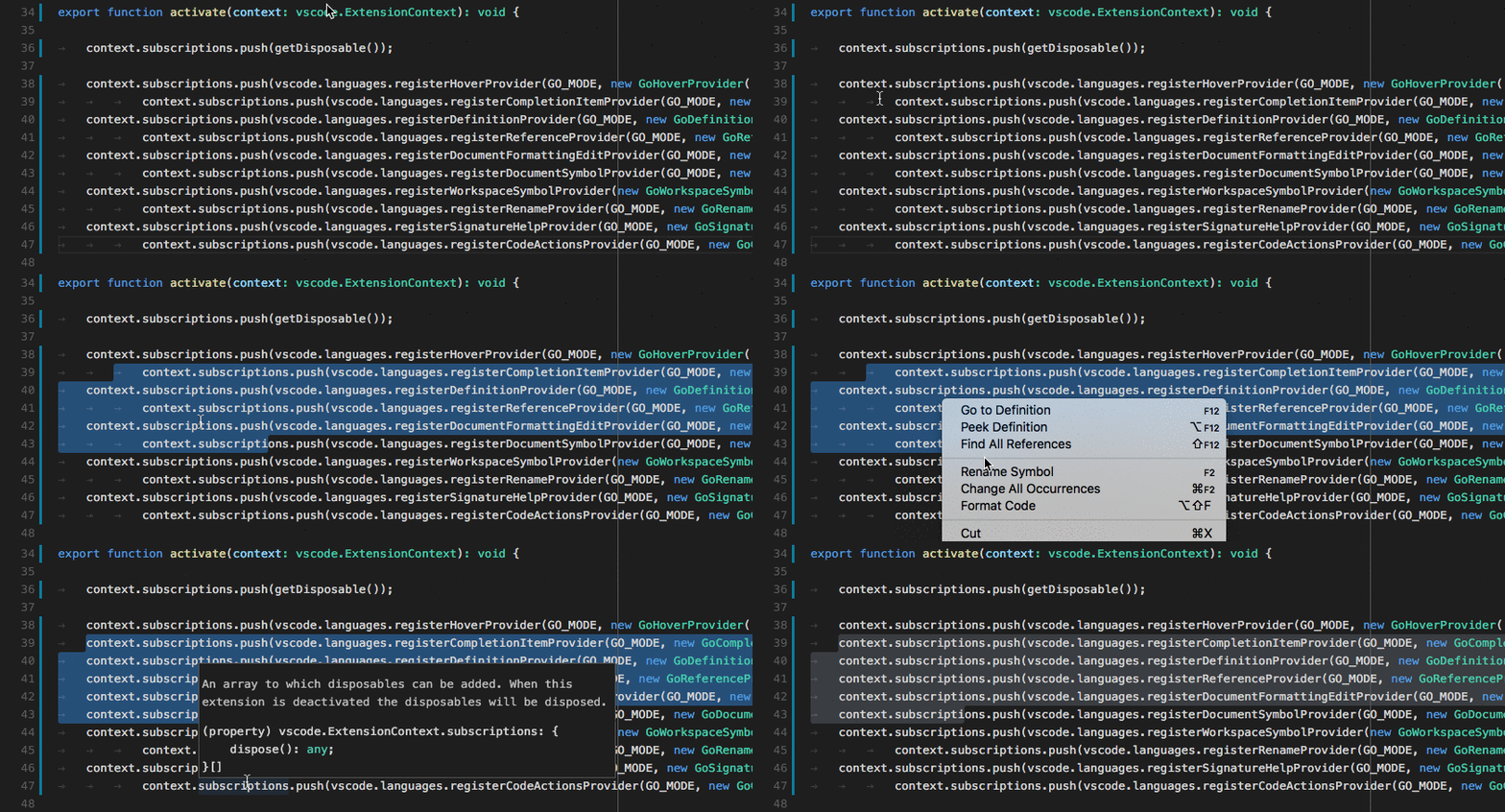
為使用者提供格式化文件中選定行範圍的支援。
語言伺服器協議
在響應 initialize 方法時,您的語言伺服器需要宣告它提供行範圍格式化支援。
{
    ...
    "capabilities" : {
        "documentRangeFormattingProvider" : "true"
        ...
    }
}
此外,您的語言伺服器需要響應 textDocument/rangeFormatting 請求。
直接實現
class GoDocumentRangeFormatter implements vscode.DocumentRangeFormattingEditProvider{
    public provideDocumentRangeFormattingEdits(
        document: vscode.TextDocument, range: vscode.Range,
        options: vscode.FormattingOptions, token: vscode.CancellationToken):
        vscode.ProviderResult<vscode.TextEdit[]> {
    ...
    }
}

export function activate(ctx: vscode.ExtensionContext): void {
    ...
    ctx.subscriptions.push(
        vscode.languages.registerDocumentRangeFormattingEditProvider(
            GO_MODE, new GoDocumentRangeFormatter()));
    ...
}
基本
不提供格式化支援。
高階
您應該始終返回最小的文字編輯,以實現原始碼的格式化。這對於確保診斷結果等標記能夠正確調整並且不丟失至關重要。
在使用者鍵入時增量格式化程式碼
為使用者提供在鍵入時格式化文字的支援。
注意:使用者 設定 editor.formatOnType 控制在使用者鍵入時是否格式化原始碼。
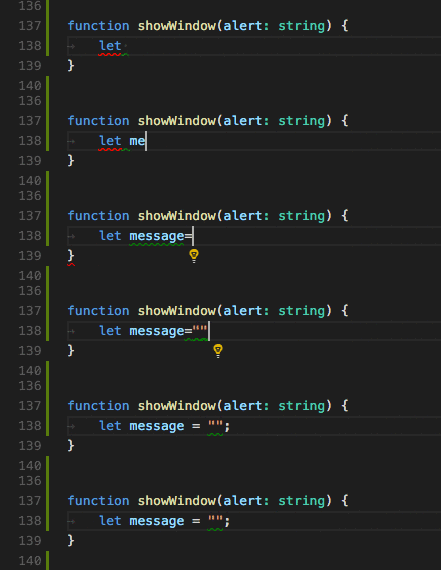
語言伺服器協議
在響應 initialize 方法時,您的語言伺服器需要宣告它提供在使用者鍵入時進行格式化的功能。它還需要告訴客戶端應在哪些字元上觸發格式化。moreTriggerCharacters 是可選的。
{
    ...
    "capabilities" : {
        "documentOnTypeFormattingProvider" : {
            "firstTriggerCharacter": "}",
            "moreTriggerCharacter": [";", ","]
        }
        ...
    }
}
此外,您的語言伺服器需要響應 textDocument/onTypeFormatting 請求。
直接實現
class GoOnTypingFormatter implements vscode.OnTypeFormattingEditProvider{
    public provideOnTypeFormattingEdits(
        document: vscode.TextDocument, position: vscode.Position,
        ch: string, options: vscode.FormattingOptions, token: vscode.CancellationToken):
        vscode.ProviderResult<vscode.TextEdit[]> {
    ...
    }
}

export function activate(ctx: vscode.ExtensionContext): void {
    ...
    ctx.subscriptions.push(
        vscode.languages.registerOnTypeFormattingEditProvider(
            GO_MODE, new GoOnTypingFormatter()));
    ...
}
基本
不提供格式化支援。
高階
您應該始終返回最小的文字編輯,以實現原始碼的格式化。這對於確保診斷結果等標記能夠正確調整並且不丟失至關重要。
重新命名符號
允許使用者重新命名一個符號並更新對該符號的所有引用。
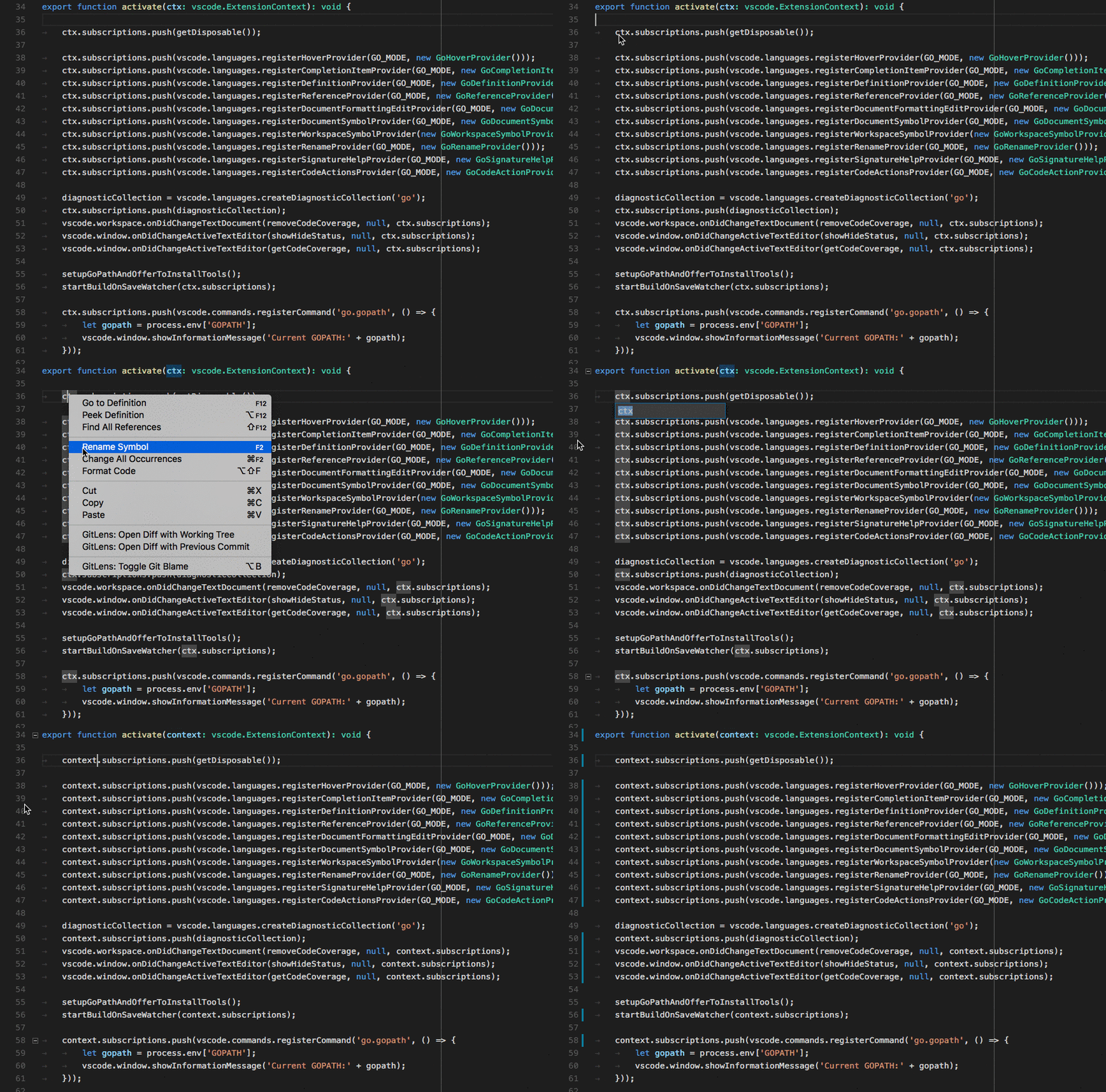
語言伺服器協議
在響應 initialize 方法時,您的語言伺服器需要宣告它提供重新命名功能。
{
    ...
    "capabilities" : {
        "renameProvider" : "true"
        ...
    }
}
此外,您的語言伺服器需要響應 textDocument/rename 請求。
直接實現
class GoRenameProvider implements vscode.RenameProvider {
    public provideRenameEdits(
        document: vscode.TextDocument, position: vscode.Position,
        newName: string, token: vscode.CancellationToken):
        Thenable<vscode.WorkspaceEdit> {
    ...
    }
}

export function activate(ctx: vscode.ExtensionContext): void {
    ...
    ctx.subscriptions.push(
        vscode.languages.registerRenameProvider(
            GO_MODE, new GoRenameProvider()));
    ...
}
基本
不提供重新命名支援。
高階
返回需要執行的所有工作區編輯的列表,例如包含符號引用的所有檔案中的所有編輯。