主題顏色
您可以使用 workbench.colorCustomizations 使用者設定自定義當前活動的 Visual Studio Code 顏色主題。
{
  "workbench.colorCustomizations": {
    "activityBar.background": "#00AA00"
  }
}
注意:如果要使用現有顏色主題,請參閱顏色主題,您將瞭解如何透過首選項:顏色主題下拉列表(⌘K ⌘T (Windows, Linux Ctrl+K Ctrl+T))設定活動顏色主題。
主題顏色可在 Webview 中作為 CSS 變數使用,並且有一個擴充套件提供了它們的 IntelliSense。
顏色格式
顏色值可以在 RGB 顏色模型中定義,並帶有用於透明度的 alpha 通道。支援以下十六進位制表示法:#RGB、#RGBA、#RRGGBB 和 #RRGGBBAA。R(紅)、G(綠)、B(藍)和 A(alpha)是十六進位制字元(0-9、a-f 或 A-F)。三位表示法(#RGB)是六位形式(#RRGGBB)的縮寫,四位 RGB 表示法(#RGBA)是八位形式(#RRGGBBAA)的縮寫。例如,#e35f 與 #ee3355ff 是相同的顏色。
如果未定義 alpha 值,則預設為 ff(不透明,無透明度)。如果 alpha 設定為 00,則顏色完全透明。
某些顏色不應不透明,以免覆蓋其他註釋。請檢視顏色描述以瞭解哪些顏色適用。
對比色
對比色通常只為高對比度主題設定。如果設定了,它們會在 UI 中的專案周圍新增額外的邊框,以增加對比度。
contrastActiveBorder:活動元素周圍的額外邊框,用於將它們與高對比度的其他元素分開。contrastBorder:元素周圍的額外邊框,用於將它們與高對比度的其他元素分開。
基本顏色
focusBorder:焦點元素的總體邊框顏色。僅當元件未覆蓋時才使用此顏色。foreground:總體前景色。僅當元件未覆蓋時才使用此顏色。disabledForeground:停用元素的總體前景色。僅當元件未覆蓋時才使用此顏色。widget.border:編輯器內 Find/Replace 等小部件的邊框顏色。widget.shadow:編輯器內 Find/Replace 等小部件的陰影顏色。selection.background:工作臺中文字選擇的背景顏色(用於輸入欄位或文字區域,不適用於編輯器和終端中的選擇)。descriptionForeground:提供附加資訊(例如標籤)的描述文字的前景色。errorForeground:錯誤訊息的總體前景色(僅當元件未覆蓋時才使用此顏色)。icon.foreground:工作臺中圖示的預設顏色。sash.hoverBorder:可拖動窗格的懸停邊框顏色。
視窗邊框
VS Code 視窗邊框的主題顏色。
window.activeBorder:活動(焦點)視窗的邊框顏色。window.inactiveBorder:非活動(非焦點)視窗的邊框顏色。
視窗邊框顏色僅在 macOS 和 Linux 上受支援(不支援 Windows),並且僅當啟用了自定義標題欄時("window.titleBarStyle": "custom")。
文字顏色
文字文件(如歡迎頁面)中的顏色。
textBlockQuote.background:文字中塊引用的背景顏色。textBlockQuote.border:文字中塊引用的邊框顏色。textCodeBlock.background:文字中程式碼塊的背景顏色。textLink.activeForeground:文字中連結被點選和滑鼠懸停時的前景色。textLink.foreground:文字中連結的前景色。textPreformat.foreground:預格式化文字段的前景色。textPreformat.background:預格式化文字段的背景顏色。textSeparator.foreground:文字分隔符的顏色。
操作顏色
用於控制工作臺中操作互動的一組顏色。
toolbar.hoverBackground:滑鼠懸停在操作上時工具欄的背景顏色toolbar.hoverOutline:滑鼠懸停在操作上時工具欄的輪廓顏色toolbar.activeBackground:按住滑鼠懸停在操作上時工具欄的背景顏色editorActionList.background:操作列表背景顏色。editorActionList.foreground:操作列表前景色。editorActionList.focusForeground:焦點項的操作列表前景色。editorActionList.focusBackground:焦點項的操作列表背景顏色。
按鈕控制元件
用於按鈕小部件的一組顏色,例如新視窗資源管理器中的開啟資料夾按鈕。
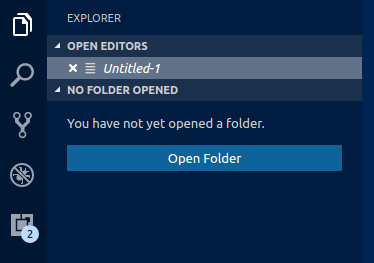
button.background:按鈕背景顏色。button.foreground:按鈕前景色。button.border:按鈕邊框顏色。button.separator:按鈕分隔符顏色。button.hoverBackground:滑鼠懸停時按鈕的背景顏色。button.secondaryForeground:輔助按鈕的前景色。button.secondaryBackground:輔助按鈕的背景顏色。button.secondaryHoverBackground:滑鼠懸停時輔助按鈕的背景顏色。checkbox.background:複選框小部件的背景顏色。checkbox.foreground:複選框小部件的前景色。checkbox.disabled.background:停用複選框的背景。checkbox.disabled.foreground:停用複選框的前景。checkbox.border:複選框小部件的邊框顏色。checkbox.selectBackground:複選框小部件在它所在的元素被選中時的背景顏色。checkbox.selectBorder:複選框小部件在它所在的元素被選中時的邊框顏色。radio.activeForeground:活動單選選項的前景色。radio.activeBackground:活動單選選項的背景顏色。radio.activeBorder:活動單選選項的邊框顏色。radio.inactiveForeground:非活動單選選項的前景色。radio.inactiveBackground:非活動單選選項的背景顏色。radio.inactiveBorder:非活動單選選項的邊框顏色。radio.inactiveHoverBackground:滑鼠懸停時非活動單選選項的背景顏色。
下拉控制元件
用於所有下拉小部件的一組顏色,例如在整合終端或輸出面板中。請注意,目前 macOS 上不使用下拉控制元件。
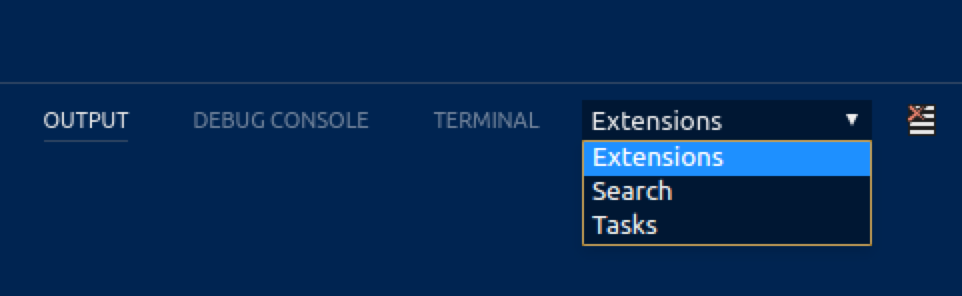
dropdown.background:下拉背景。dropdown.listBackground:下拉列表背景。dropdown.border:下拉邊框。dropdown.foreground:下拉前景色。
輸入控制元件
用於輸入控制元件的顏色,例如在搜尋檢視或查詢/替換對話方塊中。
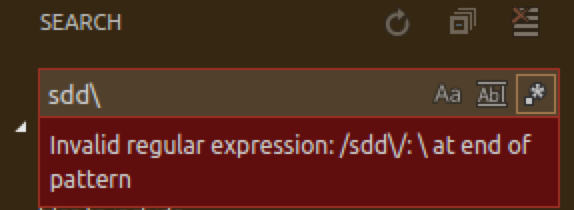
input.background:輸入框背景。input.border:輸入框邊框。input.foreground:輸入框前景色。input.placeholderForeground:輸入框中佔位符文字的前景色。inputOption.activeBackground:輸入欄位中活動選項的背景顏色。inputOption.activeBorder:輸入欄位中活動選項的邊框顏色。inputOption.activeForeground:輸入欄位中活動選項的前景色。inputOption.hoverBackground:輸入欄位中活動選項的背景顏色。inputValidation.errorBackground:錯誤嚴重性的輸入驗證背景顏色。inputValidation.errorForeground:錯誤嚴重性的輸入驗證前景色。inputValidation.errorBorder:錯誤嚴重性的輸入驗證邊框顏色。inputValidation.infoBackground:資訊嚴重性的輸入驗證背景顏色。inputValidation.infoForeground:資訊嚴重性的輸入驗證前景色。inputValidation.infoBorder:資訊嚴重性的輸入驗證邊框顏色。inputValidation.warningBackground:警告資訊嚴重性的輸入驗證背景顏色。inputValidation.warningForeground:警告嚴重性的輸入驗證前景色。inputValidation.warningBorder:警告嚴重性的輸入驗證邊框顏色。
捲軸控制元件
scrollbar.background:捲軸軌道背景顏色。scrollbar.shadow:捲軸滑塊陰影,用於指示檢視已滾動。scrollbarSlider.activeBackground:點選時捲軸滑塊的背景顏色。scrollbarSlider.background:捲軸滑塊背景顏色。scrollbarSlider.hoverBackground:滑鼠懸停時捲軸滑塊的背景顏色。
徽章
徽章是小的通知標籤,例如搜尋結果計數。
badge.foreground:徽章前景色。badge.background:徽章背景顏色。
進度條
progressBar.background:長時間執行操作時顯示的進度條背景顏色。
列表和樹
檔案資源管理器等列表和樹的顏色。活動列表/樹具有鍵盤焦點,非活動列表/樹沒有。
list.activeSelectionBackground:當列表/樹處於活動狀態時,所選專案的列表/樹背景顏色。list.activeSelectionForeground:當列表/樹處於活動狀態時,所選專案的列表/樹前景色。list.activeSelectionIconForeground:當列表/樹處於活動狀態時,所選專案的列表/樹圖示前景色。活動列表/樹具有鍵盤焦點,非活動列表/樹沒有。list.dropBackground:使用滑鼠拖動專案時列表/樹的拖放背景顏色。list.focusBackground:當列表/樹處於活動狀態時,焦點專案的列表/樹背景顏色。list.focusForeground:當列表/樹處於活動狀態時,焦點專案的列表/樹前景色。活動列表/樹具有鍵盤焦點,非活動列表/樹沒有。list.focusHighlightForeground:在列表/樹中搜索時,活動焦點專案上匹配高亮的前景色。list.focusOutline:當列表/樹處於活動狀態時,焦點專案的列表/樹輪廓顏色。活動列表/樹具有鍵盤焦點,非活動列表/樹沒有。list.focusAndSelectionOutline:當列表/樹處於活動狀態且被選中時,焦點專案的列表/樹輪廓顏色。活動列表/樹具有鍵盤焦點,非活動列表/樹沒有。list.highlightForeground:在列表/樹中搜索時,匹配高亮的前景色。list.hoverBackground:滑鼠懸停在專案上時列表/樹的背景顏色。list.hoverForeground:滑鼠懸停在專案上時列表/樹的前景色。list.inactiveSelectionBackground:當列表/樹處於非活動狀態時,所選專案的列表/樹背景顏色。list.inactiveSelectionForeground:當列表/樹處於非活動狀態時,所選專案的列表/樹前景色。活動列表/樹具有鍵盤焦點,非活動列表/樹沒有。list.inactiveSelectionIconForeground:當列表/樹處於非活動狀態時,所選專案的列表/樹圖示前景色。活動列表/樹具有鍵盤焦點,非活動列表/樹沒有。list.inactiveFocusBackground:當列表處於非活動狀態時,焦點專案的列表背景顏色。活動列表具有鍵盤焦點,非活動列表沒有。目前僅在列表中支援。list.inactiveFocusOutline:當列表/樹處於非活動狀態時,焦點專案的列表/樹輪廓顏色。活動列表/樹具有鍵盤焦點,非活動列表/樹沒有。list.invalidItemForeground:列表/樹中無效專案的前景色,例如資源管理器中未解析的根。list.errorForeground:包含錯誤的列表項的前景色。list.warningForeground:包含警告的列表項的前景色。listFilterWidget.background:在列表/樹中搜索時鍵入文字的列表/樹過濾器背景顏色。listFilterWidget.outline:在列表/樹中搜索時鍵入文字的列表/樹過濾器小部件輪廓顏色。listFilterWidget.noMatchesOutline:在列表/樹中搜索時未找到匹配項的列表/樹過濾器小部件輪廓顏色。listFilterWidget.shadow:列表和樹中型別過濾器小部件的陰影顏色。list.filterMatchBackground:列表和樹中過濾匹配項的背景顏色。list.filterMatchBorder:列表和樹中過濾匹配項的邊框顏色。list.deemphasizedForeground:被弱化的列表/樹專案的前景色。list.dropBetweenBackground:使用滑鼠在專案之間移動時列表/樹的拖放邊框顏色。tree.indentGuidesStroke:樹小部件縮排指南的描邊顏色。tree.inactiveIndentGuidesStroke:非活動縮排指南的樹描邊顏色。tree.tableColumnsBorder:縮排指南的樹描邊顏色。tree.tableOddRowsBackground:奇數行表格的背景顏色。
活動欄
活動欄通常顯示在工作臺的最左側或最右側,允許在側邊欄檢視之間快速切換。
activityBar.background:活動欄背景顏色。activityBar.dropBorder:活動欄專案的拖放反饋顏色。活動欄顯示在最左側或最右側,允許在側邊欄檢視之間切換。activityBar.foreground:活動欄前景色(例如用於圖示)。activityBar.inactiveForeground:活動欄專案處於非活動狀態時的前景色。activityBar.border:活動欄與側邊欄之間的邊框顏色。activityBarBadge.background:活動通知徽章背景顏色。activityBarBadge.foreground:活動通知徽章前景色。activityBar.activeBorder:活動欄活動指示器邊框顏色。activityBar.activeBackground:活動元素的可選活動欄背景顏色。activityBar.activeFocusBorder:活動項的活動欄焦點邊框顏色。activityBarTop.foreground:活動欄位於頂部時,專案中活動前景色。活動欄允許在側邊欄檢視之間切換。activityBarTop.activeBorder:活動欄位於頂部時,活動項的焦點邊框顏色。活動欄允許在側邊欄檢視之間切換。activityBarTop.inactiveForeground:活動欄位於頂部時,專案中非活動前景色。活動欄允許在側邊欄檢視之間切換。activityBarTop.dropBorder:活動欄位於頂部時,專案的拖放反饋顏色。活動欄允許在側邊欄檢視之間切換。activityBarTop.background:活動欄設定在頂部/底部時的背景顏色。activityBarTop.activeBackground:活動欄設定在頂部/底部時,活動項的背景顏色。活動欄允許在側邊欄檢視之間切換。activityWarningBadge.foreground:警告活動徽章的前景色activityWarningBadge.background:警告活動徽章的背景顏色activityErrorBadge.foreground:錯誤活動徽章的前景色activityErrorBadge.background:錯誤活動徽章的背景顏色
配置檔案
profileBadge.background:配置檔案徽章背景顏色。配置檔案徽章顯示在活動欄設定齒輪圖示的頂部。profileBadge.foreground:配置檔案徽章前景色。配置檔案徽章顯示在活動欄設定齒輪圖示的頂部。profiles.sashBorder:配置檔案編輯器拆分檢視窗格的邊框顏色。
側邊欄
側邊欄包含資源管理器和搜尋等檢視。
-
sideBar.background:側邊欄背景顏色。 -
sideBar.foreground:側邊欄前景色。側邊欄是資源管理器和搜尋等檢視的容器。 -
sideBar.border:側邊欄與編輯器分離處的邊框顏色。 -
sideBar.dropBackground:側邊欄部分的拖放反饋顏色。顏色應具有透明度,以便側邊欄部分仍能透視。 -
sideBarTitle.foreground:側邊欄標題前景色。 -
sideBarSectionHeader.background:側邊欄部分標題背景顏色。 -
sideBarSectionHeader.foreground:側邊欄部分標題前景色。 -
sideBarSectionHeader.border:側邊欄部分標題邊框顏色。 -
sideBarActivityBarTop.border:活動欄位於頂部/底部與檢視之間的邊框顏色。 -
sideBarTitle.background:側邊欄標題背景顏色。側邊欄是資源管理器和搜尋等檢視的容器。 -
sideBarTitle.border:側邊欄標題下方的邊框顏色,用於將標題與檢視分開。側邊欄是資源管理器和搜尋等檢視的容器。 -
sideBarStickyScroll.background:側邊欄中粘性滾動的背景顏色。 -
sideBarStickyScroll.border:側邊欄中粘性滾動的邊框顏色。 -
sideBarStickyScroll.shadow:側邊欄中粘性滾動的陰影顏色。
迷你地圖
小地圖顯示了當前檔案的微縮版本。
-
minimap.findMatchHighlight:檔案內搜尋匹配項的高亮顏色。 -
minimap.selectionHighlight:編輯器選擇的高亮顏色。 -
minimap.errorHighlight:編輯器內錯誤的高亮顏色。 -
minimap.warningHighlight:編輯器內警告的高亮顏色。 -
minimap.background:小地圖背景顏色。 -
minimap.selectionOccurrenceHighlight:重複編輯器選擇的小地圖示記顏色。 -
minimap.foregroundOpacity:小地圖中渲染的前景元素的透明度。例如,"#000000c0" 將以 75% 的透明度渲染元素。 -
minimap.infoHighlight:小地圖資訊標記顏色。 -
minimap.chatEditHighlight:小地圖中待處理編輯區域的顏色。 -
minimapSlider.background:小地圖滑塊背景顏色。 -
minimapSlider.hoverBackground:滑鼠懸停時小地圖滑塊的背景顏色。 -
minimapSlider.activeBackground:點選時小地圖滑塊的背景顏色。 -
minimapGutter.addedBackground:小地圖裝訂線中新增內容的顏色。 -
minimapGutter.modifiedBackground:小地圖裝訂線中修改內容的顏色。 -
minimapGutter.deletedBackground:小地圖裝訂線中刪除內容的顏色。 -
editorMinimap.inlineChatInserted:內聯聊天中插入內容的小地圖示記顏色。
編輯器組和選項卡
編輯器組是編輯器的容器。可以有許多編輯器組。選項卡是編輯器的容器。一個編輯器組中可以開啟多個選項卡。
-
editorGroup.border:用於分隔多個編輯器組的顏色。
-
editorGroup.dropBackground:拖動編輯器時的背景顏色。
-
editorGroupHeader.noTabsBackground:使用單個選項卡時(設定"workbench.editor.showTabs": "single")編輯器組標題標題的背景顏色。
-
editorGroupHeader.tabsBackground:選項卡容器的背景顏色。
-
editorGroupHeader.tabsBorder:啟用選項卡時編輯器選項卡控制元件下方的邊框顏色。
-
editorGroupHeader.border:編輯器組標題與編輯器之間的邊框顏色(如果啟用麵包屑,則在麵包屑下方)。 -
editorGroup.emptyBackground:空編輯器組的背景顏色。 -
editorGroup.focusedEmptyBorder:焦點空編輯器組的邊框顏色。 -
editorGroup.dropIntoPromptForeground:拖動檔案時顯示在編輯器上方的文字前景色。此文字告知使用者可以按住 shift 鍵將檔案拖放到編輯器中。 -
editorGroup.dropIntoPromptBackground:拖動檔案時顯示在編輯器上方的文字背景顏色。此文字告知使用者可以按住 shift 鍵將檔案拖放到編輯器中。 -
editorGroup.dropIntoPromptBorder:拖動檔案時顯示在編輯器上方的文字邊框顏色。此文字告知使用者可以按住 shift 鍵將檔案拖放到編輯器中。 -
tab.activeBackground:活動組中活動選項卡的背景顏色。 -
tab.unfocusedActiveBackground:非活動編輯器組中活動選項卡的背景顏色。 -
tab.activeForeground:活動組中活動選項卡的前景色。 -
tab.border:用於分隔選項卡之間的邊框。 -
tab.activeBorder:活動選項卡的底部邊框。 -
tab.selectedBorderTop:所選選項卡頂部的邊框。選項卡是編輯器區域中編輯器的容器。一個編輯器組中可以開啟多個選項卡。可以有多個編輯器組。 -
tab.selectedBackground:所選選項卡的背景。選項卡是編輯器區域中編輯器的容器。一個編輯器組中可以開啟多個選項卡。可以有多個編輯器組。 -
tab.selectedForeground:所選選項卡的前景。選項卡是編輯器區域中編輯器的容器。一個編輯器組中可以開啟多個選項卡。可以有多個編輯器組。 -
tab.dragAndDropBorder:選項卡之間的邊框,用於指示可以在兩個選項卡之間插入一個選項卡。選項卡是編輯器區域中編輯器的容器。一個編輯器組中可以開啟多個選項卡。可以有多個編輯器組。 -
tab.unfocusedActiveBorder:非活動編輯器組中活動選項卡的底部邊框。 -
tab.activeBorderTop:活動選項卡的頂部邊框。 -
tab.unfocusedActiveBorderTop:非活動編輯器組中活動選項卡的頂部邊框 -
tab.lastPinnedBorder:最後一個固定編輯器右側的邊框,用於將其與非固定編輯器分隔開。 -
tab.inactiveBackground:非活動選項卡的背景顏色。 -
tab.unfocusedInactiveBackground:非焦點組中非活動選項卡的背景顏色 -
tab.inactiveForeground:活動組中非活動選項卡的前景色。 -
tab.unfocusedActiveForeground:非活動編輯器組中活動選項卡的前景色。 -
tab.unfocusedInactiveForeground:非活動編輯器組中非活動選項卡的前景色。 -
tab.hoverBackground:滑鼠懸停時選項卡的背景顏色 -
tab.unfocusedHoverBackground:滑鼠懸停時非焦點組中選項卡的背景顏色 -
tab.hoverForeground:滑鼠懸停時選項卡的前景色 -
tab.unfocusedHoverForeground:滑鼠懸停時非焦點組中選項卡的前景色 -
tab.hoverBorder:滑鼠懸停時用於高亮顯示選項卡的邊框 -
tab.unfocusedHoverBorder:滑鼠懸停時用於高亮顯示非焦點組中選項卡的邊框 -
tab.activeModifiedBorder:活動組中已修改(髒)活動選項卡頂部的邊框。 -
tab.inactiveModifiedBorder:活動組中已修改(髒)非活動選項卡頂部的邊框。 -
tab.unfocusedActiveModifiedBorder:非焦點組中已修改(髒)活動選項卡頂部的邊框。 -
tab.unfocusedInactiveModifiedBorder:非焦點組中已修改(髒)非活動選項卡頂部的邊框。 -
editorPane.background:居中編輯器佈局左右兩側可見的編輯器窗格的背景顏色。 -
sideBySideEditor.horizontalBorder:在編輯器組中從上到下並排顯示兩個編輯器時,用於分隔它們的顏色。 -
sideBySideEditor.verticalBorder:在編輯器組中從左到右並排顯示兩個編輯器時,用於分隔它們的顏色。
編輯器顏色
最突出的編輯器顏色是用於語法高亮的令牌顏色,它們基於安裝的語言語法。這些顏色由顏色主題定義,也可以使用 editor.tokenColorCustomizations 設定進行自定義。有關更新顏色主題和可用令牌型別的詳細資訊,請參閱自定義顏色主題。
所有其他編輯器顏色都列在這裡
editor.background:編輯器背景顏色。editor.foreground:編輯器預設前景色。editorLineNumber.foreground:編輯器行號的顏色。editorLineNumber.activeForeground:活動編輯器行號的顏色。editorLineNumber.dimmedForeground:當 editor.renderFinalNewline 設定為 dimmed 時,最後一行編輯器行號的顏色。editorCursor.background:編輯器游標的背景顏色。允許自定義被塊游標覆蓋的字元的顏色。editorCursor.foreground:編輯器游標的顏色。editorMultiCursor.primary.foreground:存在多個游標時主編輯器游標的顏色。editorMultiCursor.primary.background:存在多個游標時主編輯器游標的背景顏色。允許自定義被塊游標覆蓋的字元的顏色。editorMultiCursor.secondary.foreground:存在多個游標時輔助編輯器游標的顏色。editorMultiCursor.secondary.background:存在多個游標時輔助編輯器游標的背景顏色。允許自定義被塊游標覆蓋的字元的顏色。editor.placeholder.foreground:編輯器中佔位符文字的前景色。editor.compositionBorder:IME 組合的邊框顏色。
選擇顏色在選擇一個或多個字元時可見。除了選擇之外,所有具有相同內容的區域也會高亮顯示。
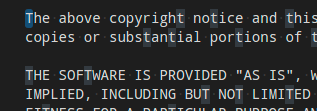
editor.selectionBackground:編輯器選擇的顏色。editor.selectionForeground:高對比度選擇文字的顏色。editor.inactiveSelectionBackground:非活動編輯器中選擇的顏色。顏色不能不透明,以免隱藏底層裝飾。editor.selectionHighlightBackground:與選擇內容相同的區域的顏色。顏色不能不透明,以免隱藏底層裝飾。editor.selectionHighlightBorder:與選擇內容相同的區域的邊框顏色。
單詞高亮顏色在游標位於符號或單詞內部時可見。根據檔案型別可用的語言支援,所有匹配的引用和宣告都會高亮顯示,並且讀寫訪問會獲得不同的顏色。如果文件符號語言支援不可用,則會回退到單詞高亮。
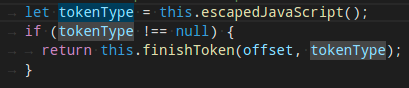
editor.wordHighlightBackground:讀取訪問期間符號的背景顏色,例如讀取變數時。顏色不能不透明,以免隱藏底層裝飾。editor.wordHighlightBorder:讀取訪問期間符號的邊框顏色,例如讀取變數時。editor.wordHighlightStrongBackground:寫入訪問期間符號的背景顏色,例如寫入變數時。顏色不能不透明,以免隱藏底層裝飾。editor.wordHighlightStrongBorder:寫入訪問期間符號的邊框顏色,例如寫入變數時。editor.wordHighlightTextBackground:符號的文字出現背景顏色。顏色不能不透明,以免隱藏底層裝飾。editor.wordHighlightTextBorder:符號的文字出現邊框顏色。
查詢顏色取決於查詢/替換對話方塊中的當前查詢字串。

editor.findMatchBackground:當前搜尋匹配項的顏色。editor.findMatchForeground:當前搜尋匹配項的文字顏色。editor.findMatchHighlightForeground:其他搜尋匹配項的前景色。editor.findMatchHighlightBackground:其他搜尋匹配項的顏色。顏色不能不透明,以免隱藏底層裝飾。editor.findRangeHighlightBackground:限制搜尋範圍的顏色(在查詢小部件中啟用“在選中內容中查詢”)。顏色不能不透明,以免隱藏底層裝飾。editor.findMatchBorder:當前搜尋匹配項的邊框顏色。editor.findMatchHighlightBorder:其他搜尋匹配項的邊框顏色。editor.findRangeHighlightBorder:限制搜尋範圍的邊框顏色(在查詢小部件中啟用“在選中內容中查詢”)。
搜尋顏色用於搜尋檢視的全域性搜尋結果。
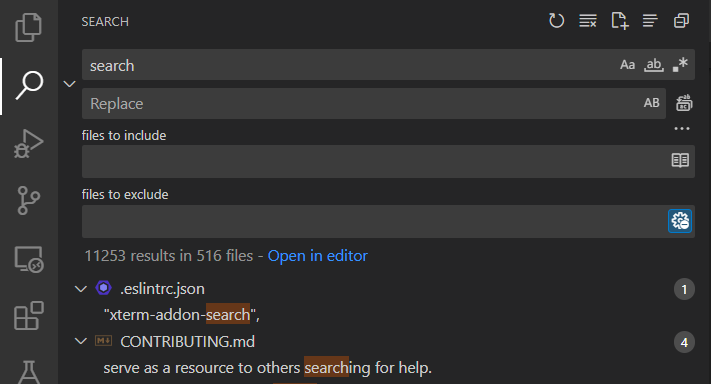
search.resultsInfoForeground:搜尋檢視完成訊息中的文字顏色。例如,此顏色用於顯示“在 {y} 個檔案中找到 {x} 個結果”的文字。
搜尋編輯器顏色高亮顯示搜尋編輯器中的結果。這可以與查詢匹配項分開配置,以便更好地區分同一編輯器中的不同類別的匹配項。
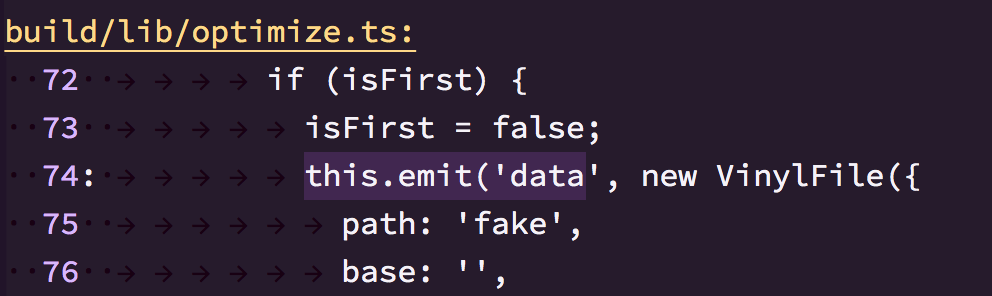
searchEditor.findMatchBackground:編輯器結果的顏色。searchEditor.findMatchBorder:編輯器結果的邊框顏色。searchEditor.textInputBorder:搜尋編輯器文字輸入框邊框。
懸停高亮顯示在顯示懸停的符號後面。
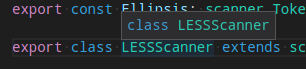
editor.hoverHighlightBackground:顯示懸停的單詞下方的高亮顯示。顏色不能不透明,以免隱藏底層裝飾。
當前行通常顯示為背景高亮或邊框(不能同時顯示)。

editor.lineHighlightBackground:游標位置行高亮的背景顏色。editor.inactiveLineHighlightBackground:編輯器未聚焦時,游標位置行高亮的背景顏色。editor.lineHighlightBorder:游標位置行周圍邊框的背景顏色。
Unicode 高亮的顏色
editorUnicodeHighlight.border:用於高亮顯示 unicode 字元的邊框顏色。editorUnicodeHighlight.background:用於高亮顯示 unicode 字元的背景顏色。
連結顏色在點選連結時可見。

editorLink.activeForeground:活動連結的顏色。
範圍高亮在選擇搜尋結果時可見。
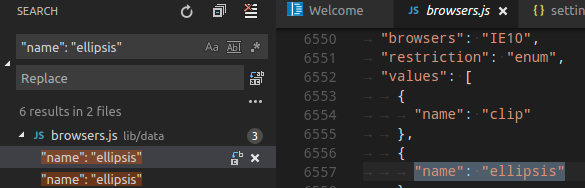
editor.rangeHighlightBackground:高亮範圍的背景顏色,用於快速開啟、檔案中符號和查詢功能。顏色不能不透明,以免隱藏底層裝飾。editor.rangeHighlightBorder:高亮範圍周圍邊框的背景顏色。
符號高亮在透過轉到定義等命令導航到符號時可見。
editor.symbolHighlightBackground:高亮符號的背景顏色。顏色不能不透明,以免隱藏底層裝飾。editor.symbolHighlightBorder:高亮符號周圍邊框的背景顏色。
要檢視編輯器中的空格,請啟用切換渲染空格。
editorWhitespace.foreground:編輯器中空格字元的顏色。
要檢視編輯器縮排指南,請設定 "editor.guides.indentation": true 和 "editor.guides.highlightActiveIndentation": true。
editorIndentGuide.background:編輯器縮排指南的顏色。editorIndentGuide.background1:編輯器縮排指南的顏色 (1)。editorIndentGuide.background2:編輯器縮排指南的顏色 (2)。editorIndentGuide.background3:編輯器縮排指南的顏色 (3)。editorIndentGuide.background4:編輯器縮排指南的顏色 (4)。editorIndentGuide.background5:編輯器縮排指南的顏色 (5)。editorIndentGuide.background6:編輯器縮排指南的顏色 (6)。editorIndentGuide.activeBackground:活動編輯器縮排指南的顏色。editorIndentGuide.activeBackground1:活動編輯器縮排指南的顏色 (1)。editorIndentGuide.activeBackground2:活動編輯器縮排指南的顏色 (2)。editorIndentGuide.activeBackground3:活動編輯器縮排指南的顏色 (3)。editorIndentGuide.activeBackground4:活動編輯器縮排指南的顏色 (4)。editorIndentGuide.activeBackground5:活動編輯器縮排指南的顏色 (5)。editorIndentGuide.activeBackground6:活動編輯器縮排指南的顏色 (6)。
要檢視編輯器內聯提示,請設定 "editor.inlineSuggest.enabled": true。
editorInlayHint.background:內聯提示的背景顏色。editorInlayHint.foreground:內聯提示的前景色。editorInlayHint.typeForeground:型別內聯提示的前景色editorInlayHint.typeBackground:型別內聯提示的背景顏色editorInlayHint.parameterForeground:引數內聯提示的前景色editorInlayHint.parameterBackground:引數內聯提示的背景顏色
要檢視編輯器標尺,請使用 "editor.rulers" 定義它們的位置
-
editorRuler.foreground:編輯器標尺的顏色。 -
editor.linkedEditingBackground:編輯器處於連結編輯模式時的背景顏色。
CodeLens

editorCodeLens.foreground:編輯器 CodeLens 的前景色。
燈泡
editorLightBulb.foreground:用於燈泡操作圖示的顏色。editorLightBulbAutoFix.foreground:用於燈泡自動修復操作圖示的顏色。editorLightBulbAi.foreground:用於燈泡 AI 圖示的顏色。
括號匹配
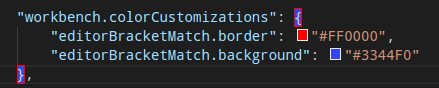
editorBracketMatch.background:匹配括號後面的背景顏色。editorBracketMatch.border:匹配括號框的顏色。
括號對顏色化
editorBracketHighlight.foreground1:括號前景色 (1)。需要啟用括號對顏色化。editorBracketHighlight.foreground2:括號前景色 (2)。需要啟用括號對顏色化。editorBracketHighlight.foreground3:括號前景色 (3)。需要啟用括號對顏色化。editorBracketHighlight.foreground4:括號前景色 (4)。需要啟用括號對顏色化。editorBracketHighlight.foreground5:括號前景色 (5)。需要啟用括號對顏色化。editorBracketHighlight.foreground6:括號前景色 (6)。需要啟用括號對顏色化。editorBracketHighlight.unexpectedBracket.foreground:意外括號的前景色。
括號對指南
-
editorBracketPairGuide.activeBackground1:活動括號對指南的背景顏色 (1)。需要啟用括號對指南。 -
editorBracketPairGuide.activeBackground2:活動括號對指南的背景顏色 (2)。需要啟用括號對指南。 -
editorBracketPairGuide.activeBackground3:活動括號對指南的背景顏色 (3)。需要啟用括號對指南。 -
editorBracketPairGuide.activeBackground4:活動括號對指南的背景顏色 (4)。需要啟用括號對指南。 -
editorBracketPairGuide.activeBackground5:活動括號對指南的背景顏色 (5)。需要啟用括號對指南。 -
editorBracketPairGuide.activeBackground6:活動括號對指南的背景顏色 (6)。需要啟用括號對指南。 -
editorBracketPairGuide.background1:非活動括號對指南的背景顏色 (1)。需要啟用括號對指南。 -
editorBracketPairGuide.background2:非活動括號對指南的背景顏色 (2)。需要啟用括號對指南。 -
editorBracketPairGuide.background3:非活動括號對指南的背景顏色 (3)。需要啟用括號對指南。 -
editorBracketPairGuide.background4:非活動括號對指南的背景顏色 (4)。需要啟用括號對指南。 -
editorBracketPairGuide.background5:非活動括號對指南的背景顏色 (5)。需要啟用括號對指南。 -
editorBracketPairGuide.background6:非活動括號對指南的背景顏色 (6)。需要啟用括號對指南。
摺疊
editor.foldBackground:摺疊區域的背景顏色。顏色不能不透明,以免隱藏底層裝飾。editor.foldPlaceholderForeground:摺疊區域第一行後摺疊文字的顏色。
概覽標尺
此標尺位於編輯器右邊緣捲軸下方,提供編輯器中裝飾的概覽。
editorOverviewRuler.background:編輯器概覽標尺的背景顏色。僅當啟用了小地圖並將其放置在編輯器的右側時使用。editorOverviewRuler.border:概覽標尺邊框的顏色。editorOverviewRuler.findMatchForeground:查詢匹配項的概覽標尺標記顏色。顏色不能不透明,以免隱藏底層裝飾。editorOverviewRuler.rangeHighlightForeground:高亮範圍(例如快速開啟、檔案中符號和查詢功能)的概覽標尺標記顏色。顏色不能不透明,以免隱藏底層裝飾。editorOverviewRuler.selectionHighlightForeground:選擇高亮顯示的概覽標尺標記顏色。顏色不能不透明,以免隱藏底層裝飾。editorOverviewRuler.wordHighlightForeground:符號高亮顯示的概覽標尺標記顏色。顏色不能不透明,以免隱藏底層裝飾。editorOverviewRuler.wordHighlightStrongForeground:寫入訪問符號高亮顯示的概覽標尺標記顏色。顏色不能不透明,以免隱藏底層裝飾。editorOverviewRuler.wordHighlightTextForeground:符號的文字出現概覽標尺標記顏色。顏色不能不透明,以免隱藏底層裝飾。editorOverviewRuler.modifiedForeground:修改內容的概覽標尺標記顏色。editorOverviewRuler.addedForeground:新增內容的概覽標尺標記顏色。editorOverviewRuler.deletedForeground:刪除內容的概覽標尺標記顏色。editorOverviewRuler.errorForeground:錯誤的概覽標尺標記顏色。editorOverviewRuler.warningForeground:警告的概覽標尺標記顏色。editorOverviewRuler.infoForeground:資訊的概覽標尺標記顏色。editorOverviewRuler.bracketMatchForeground:匹配括號的概覽標尺標記顏色。editorOverviewRuler.inlineChatInserted:內聯聊天中插入內容的概覽標尺標記顏色。editorOverviewRuler.inlineChatRemoved:內聯聊天中刪除內容的概覽標尺標記顏色。editorOverviewRuler.commentDraftForeground:具有草稿註釋的註釋執行緒的編輯器概覽標尺裝飾顏色。此顏色應不透明。
錯誤和警告
editorError.foreground:編輯器中錯誤波浪線的前景色。editorError.border:編輯器中錯誤框的邊框顏色。editorError.background:編輯器中錯誤文字的背景顏色。顏色不能不透明,以免隱藏底層裝飾。editorWarning.foreground:編輯器中警告波浪線的前景色。editorWarning.border:編輯器中警告框的邊框顏色。editorWarning.background:編輯器中警告文字的背景顏色。顏色不能不透明,以免隱藏底層裝飾。editorInfo.foreground:編輯器中資訊波浪線的前景色。editorInfo.border:編輯器中資訊框的邊框顏色。editorInfo.background:編輯器中資訊文字的背景顏色。顏色不能不透明,以免隱藏底層裝飾。editorHint.foreground:編輯器中提示的前景色。editorHint.border:編輯器中提示框的邊框顏色。problemsErrorIcon.foreground:用於問題錯誤圖示的顏色。problemsWarningIcon.foreground:用於問題警告圖示的顏色。problemsInfoIcon.foreground:用於問題資訊圖示的顏色。
未使用的原始碼
editorUnnecessaryCode.border:編輯器中不必要(未使用)原始碼的邊框顏色。editorUnnecessaryCode.opacity:編輯器中不必要(未使用)原始碼的透明度。例如,"#000000c0"將以 75% 的透明度渲染程式碼。對於高對比度主題,請使用"editorUnnecessaryCode.border"主題顏色來高亮顯示不必要的程式碼,而不是使其褪色。
裝訂線包含字形邊距和行號
editorGutter.background:編輯器裝訂線的背景顏色。裝訂線包含字形邊距和行號。editorGutter.modifiedBackground:已修改行的編輯器裝訂線背景顏色。editorGutter.modifiedSecondaryBackground:已修改行的編輯器裝訂線輔助背景顏色。editorGutter.addedBackground:已新增行的編輯器裝訂線背景顏色。editorGutter.addedSecondaryBackground:已新增行的編輯器裝訂線輔助背景顏色。editorGutter.deletedBackground:已刪除行的編輯器裝訂線背景顏色。editorGutter.deletedSecondaryBackground:已刪除行的編輯器裝訂線輔助背景顏色。editorGutter.commentRangeForeground:註釋範圍的編輯器裝訂線裝飾顏色。editorGutter.commentGlyphForeground:註釋字形的編輯器裝訂線裝飾顏色。editorGutter.commentUnresolvedGlyphForeground:未解決註釋執行緒的註釋字形的編輯器裝訂線裝飾顏色。editorGutter.foldingControlForeground:編輯器裝訂線中摺疊控制元件的顏色。editorGutter.itemGlyphForeground:裝訂線專案字形的編輯器裝訂線裝飾顏色。editorGutter.itemBackground:裝訂線專案背景的編輯器裝訂線裝飾顏色。此顏色應不透明。editorGutter.commentDraftGlyphForeground:具有草稿註釋的註釋執行緒的註釋字形的編輯器裝訂線裝飾顏色。
編輯器註釋小部件在檢視拉取請求時可見
editorCommentsWidget.resolvedBorder:已解決註釋的邊框和箭頭的顏色。editorCommentsWidget.unresolvedBorder:未解決註釋的邊框和箭頭的顏色。editorCommentsWidget.rangeBackground:註釋範圍的背景顏色。editorCommentsWidget.rangeActiveBackground:當前選擇或懸停註釋範圍的背景顏色。editorCommentsWidget.replyInputBackground:註釋回覆輸入框的背景顏色。
使用 Copilot 建議下一個更改時,可以看到編輯器內聯編輯
inlineEdit.gutterIndicator.primaryBorder:主內聯編輯裝訂線指示器的邊框顏色。inlineEdit.gutterIndicator.primaryForeground:主內聯編輯裝訂線指示器的前景色。inlineEdit.gutterIndicator.primaryBackground:主內聯編輯裝訂線指示器的背景顏色。inlineEdit.gutterIndicator.secondaryBorder:輔助內聯編輯裝訂線指示器的邊框顏色。inlineEdit.gutterIndicator.secondaryForeground:輔助內聯編輯裝訂線指示器的前景色。inlineEdit.gutterIndicator.secondaryBackground:輔助內聯編輯裝訂線指示器的背景顏色。inlineEdit.gutterIndicator.successfulBorder:成功內聯編輯裝訂線指示器的邊框顏色。inlineEdit.gutterIndicator.successfulForeground:成功內聯編輯裝訂線指示器的前景色。inlineEdit.gutterIndicator.successfulBackground:成功內聯編輯裝訂線指示器的背景顏色。inlineEdit.gutterIndicator.background:內聯編輯裝訂線指示器的背景顏色。inlineEdit.originalBackground:內聯編輯中原始文字的背景顏色。inlineEdit.modifiedBackground:內聯編輯中修改文字的背景顏色。inlineEdit.originalChangedLineBackground:內聯編輯中原始文字中更改行的背景顏色。inlineEdit.originalChangedTextBackground:內聯編輯中原始文字中更改文字的疊加顏色。inlineEdit.modifiedChangedLineBackground:內聯編輯中修改文字中更改行的背景顏色。inlineEdit.modifiedChangedTextBackground:內聯編輯中修改文字中更改文字的疊加顏色。inlineEdit.originalBorder:內聯編輯中原始文字的邊框顏色。inlineEdit.modifiedBorder:內聯編輯中修改文字的邊框顏色。inlineEdit.tabWillAcceptModifiedBorder:當 tab 鍵將接受時,內聯編輯小部件的修改邊框顏色。inlineEdit.tabWillAcceptOriginalBorder:當 tab 鍵將接受時,內聯編輯小部件原始文字上方的原始邊框顏色。
差異編輯器顏色
要為插入和刪除的文字著色,請使用背景顏色或邊框顏色,但不要同時使用兩者。
diffEditor.insertedTextBackground:已插入文字的背景顏色。顏色不能不透明,以免隱藏底層裝飾。diffEditor.insertedTextBorder:已插入文字的輪廓顏色。diffEditor.removedTextBackground:已刪除文字的背景顏色。顏色不能不透明,以免隱藏底層裝飾。diffEditor.removedTextBorder:已刪除文字的輪廓顏色。diffEditor.border:兩個文字編輯器之間的邊框顏色。diffEditor.diagonalFill:差異編輯器的對角線填充顏色。對角線填充用於並排差異檢視。diffEditor.insertedLineBackground:已插入行的背景顏色。顏色不能不透明,以免隱藏底層裝飾。diffEditor.removedLineBackground:已刪除行的背景顏色。顏色不能不透明,以免隱藏底層裝飾。diffEditorGutter.insertedLineBackground:已插入行的邊距背景顏色。diffEditorGutter.removedLineBackground:已刪除行的邊距背景顏色。diffEditorOverview.insertedForeground:插入內容的差異概覽標尺前景色。diffEditorOverview.removedForeground:刪除內容的差異概覽標尺前景色。diffEditor.unchangedRegionBackground:差異編輯器中未更改塊的顏色。diffEditor.unchangedRegionForeground:差異編輯器中未更改塊的前景色。diffEditor.unchangedRegionShadow:未更改區域小部件周圍的陰影顏色。diffEditor.unchangedCodeBackground:差異編輯器中未更改程式碼的背景顏色。diffEditor.move.border:差異編輯器中移動文字的邊框顏色。diffEditor.moveActive.border:差異編輯器中移動文字的活動邊框顏色。multiDiffEditor.headerBackground:差異編輯器標題的背景顏色multiDiffEditor.background:多檔案差異編輯器的背景顏色multiDiffEditor.border:多檔案差異編輯器的邊框顏色
聊天顏色
chat.requestBorder:聊天請求的邊框顏色。chat.requestBackground:聊天請求的背景顏色。chat.slashCommandBackground:聊天斜槓命令的背景顏色。chat.slashCommandForeground:聊天斜槓命令的前景色。chat.avatarBackground:聊天頭像的背景顏色。chat.avatarForeground:聊天頭像的前景色。chat.editedFileForeground:已編輯檔案列表中聊天已編輯檔案的前景色。chat.linesAddedForeground:聊天程式碼塊中新增行Pill的前景色。chat.linesRemovedForeground:聊天程式碼塊中刪除行Pill的前景色。chat.requestCodeBorder:聊天請求氣泡內程式碼塊的邊框顏色。chat.requestBubbleBackground:聊天請求氣泡的背景顏色。chat.requestBubbleHoverBackground:滑鼠懸停時聊天請求氣泡的背景顏色。chat.checkpointSeparator:聊天檢查點分隔符顏色。chatManagement.sashBorder:聊天管理編輯器拆分檢視窗格的邊框顏色。
內聯聊天顏色
inlineChat.background:互動式編輯器小部件的背景顏色。inlineChat.foreground:互動式編輯器小部件的前景色inlineChat.border:互動式編輯器小部件的邊框顏色。inlineChat.shadow:互動式編輯器小部件的陰影顏色。inlineChatInput.border:互動式編輯器輸入的邊框顏色。inlineChatInput.focusBorder:焦點互動式編輯器輸入的邊框顏色。inlineChatInput.placeholderForeground:互動式編輯器輸入佔位符的前景色。inlineChatInput.background:互動式編輯器輸入的背景顏色。inlineChatDiff.inserted:互動式編輯器輸入中插入文字的背景顏色。inlineChatDiff.removed:互動式編輯器輸入中刪除文字的背景顏色。
面板聊天顏色
interactive.activeCodeBorder:編輯器具有焦點時當前互動式程式碼單元格的邊框顏色。interactive.inactiveCodeBorder:編輯器沒有焦點時當前互動式程式碼單元格的邊框顏色。
編輯器小部件顏色
編輯器小部件顯示在編輯器內容前面。示例包括查詢/替換對話方塊、建議小部件和編輯器懸停。
-
editorWidget.foreground:編輯器小部件(如查詢/替換)的前景色。 -
editorWidget.background:編輯器小部件(如查詢/替換)的背景顏色。 -
editorWidget.border:編輯器小部件的邊框顏色,除非小部件不包含邊框或定義了自己的邊框顏色。 -
editorWidget.resizeBorder:編輯器小部件調整大小欄的邊框顏色。僅當小部件選擇具有調整大小邊框且顏色未被小部件覆蓋時使用。 -
editorSuggestWidget.background:建議小部件的背景顏色。 -
editorSuggestWidget.border:建議小部件的邊框顏色。 -
editorSuggestWidget.foreground:建議小部件的前景色。 -
editorSuggestWidget.focusHighlightForeground:專案聚焦時建議小部件中匹配高亮的前景色。 -
editorSuggestWidget.highlightForeground:建議小部件中匹配高亮的前景色。 -
editorSuggestWidget.selectedBackground:建議小部件中選定條目的背景顏色。 -
editorSuggestWidget.selectedForeground:建議小部件中選定條目的前景色。 -
editorSuggestWidget.selectedIconForeground:建議小部件中選定條目的圖示前景色。 -
editorSuggestWidgetStatus.foreground:建議小部件狀態的前景色。 -
editorHoverWidget.foreground:編輯器懸停的前景色。 -
editorHoverWidget.background:編輯器懸停的背景顏色。 -
editorHoverWidget.border:編輯器懸停的邊框顏色。 -
editorHoverWidget.highlightForeground:引數提示中活動專案的前景色。 -
editorHoverWidget.statusBarBackground:編輯器懸停狀態列的背景顏色。 -
editorGhostText.border:內聯完成提供者和建議預覽顯示的幽靈文字的邊框顏色。 -
editorGhostText.background:編輯器中幽靈文字的背景顏色。 -
editorGhostText.foreground:內聯完成提供者和建議預覽顯示的幽靈文字的前景色。 -
editorStickyScroll.background:編輯器粘性滾動背景顏色。 -
editorStickyScroll.border:編輯器中粘性滾動的邊框顏色。 -
editorStickyScroll.shadow:編輯器中粘性滾動的陰影顏色。 -
editorStickyScrollGutter.background:編輯器中粘性滾動裝訂線部分的背景顏色。 -
editorStickyScrollHover.background:滑鼠懸停時編輯器粘性滾動的背景顏色。
除錯異常小部件是一個當除錯在異常處停止時顯示在編輯器中的窺視檢視。
debugExceptionWidget.background:異常小部件背景顏色。debugExceptionWidget.border:異常小部件邊框顏色。
編輯器標記檢視在導航到編輯器中的錯誤和警告時顯示(轉到下一個錯誤或警告命令)。
editorMarkerNavigation.background:編輯器標記導航小部件背景。editorMarkerNavigationError.background:編輯器標記導航小部件錯誤顏色。editorMarkerNavigationWarning.background:編輯器標記導航小部件警告顏色。editorMarkerNavigationInfo.background:編輯器標記導航小部件資訊顏色。editorMarkerNavigationError.headerBackground:編輯器標記導航小部件錯誤標題背景。editorMarkerNavigationWarning.headerBackground:編輯器標記導航小部件警告標題背景。editorMarkerNavigationInfo.headerBackground:編輯器標記導航小部件資訊標題背景。
窺視檢視顏色
窺視檢視用於在編輯器內部顯示引用和宣告。
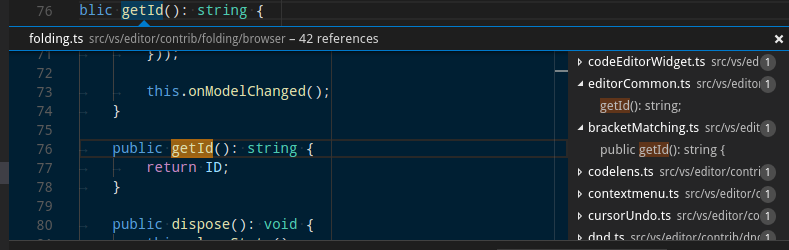
peekView.border:窺視檢視邊框和箭頭的顏色。peekViewEditor.background:窺視檢視編輯器的背景顏色。peekViewEditorGutter.background:窺視檢視編輯器中裝訂線的背景顏色。peekViewEditor.matchHighlightBackground:窺視檢視編輯器中的匹配高亮顏色。peekViewEditor.matchHighlightBorder:窺視檢視編輯器中的匹配高亮邊框顏色。peekViewResult.background:窺視檢視結果列表的背景顏色。peekViewResult.fileForeground:窺視檢視結果列表中檔案節點的前景色。peekViewResult.lineForeground:窺視檢視結果列表中行節點的前景色。peekViewResult.matchHighlightBackground:窺視檢視結果列表中的匹配高亮顏色。peekViewResult.selectionBackground:窺視檢視結果列表中選定條目的背景顏色。peekViewResult.selectionForeground:窺視檢視結果列表中選定條目的前景色。peekViewTitle.background:窺視檢視標題區域的背景顏色。peekViewTitleDescription.foreground:窺視檢視標題資訊的顏色。peekViewTitleLabel.foreground:窺視檢視標題的顏色。peekViewEditorStickyScroll.background:窺視檢視編輯器中粘性滾動的背景顏色。peekViewEditorStickyScrollGutter.background:窺視檢視編輯器中粘性滾動裝訂線部分的背景顏色。
合併衝突顏色
當編輯器包含特殊差異範圍時,會顯示合併衝突裝飾。
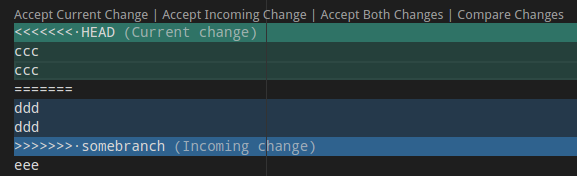
merge.currentHeaderBackground:內聯合並衝突中的當前標題背景。顏色不能不透明,以免隱藏底層裝飾。merge.currentContentBackground:內聯合並衝突中的當前內容背景。顏色不能不透明,以免隱藏底層裝飾。merge.incomingHeaderBackground:內聯合並衝突中的傳入標題背景。顏色不能不透明,以免隱藏底層裝飾。merge.incomingContentBackground:內聯合並衝突中的傳入內容背景。顏色不能不透明,以免隱藏底層裝飾。merge.border:內聯合並衝突中標題和分隔符的邊框顏色。merge.commonContentBackground:內聯合並衝突中的共同祖先內容背景。顏色不能不透明,以免隱藏底層裝飾。merge.commonHeaderBackground:內聯合並衝突中的共同祖先標題背景。顏色不能不透明,以免隱藏底層裝飾。editorOverviewRuler.currentContentForeground:內聯合並衝突中當前內容的概覽標尺前景色。editorOverviewRuler.incomingContentForeground:內聯合並衝突中傳入內容的概覽標尺前景色。editorOverviewRuler.commonContentForeground:內聯合並衝突中共同祖先內容的概覽標尺前景色。editorOverviewRuler.commentForeground:已解決註釋的編輯器概覽標尺裝飾顏色。此顏色應不透明。editorOverviewRuler.commentUnresolvedForeground:未解決註釋的編輯器概覽標尺裝飾顏色。此顏色應不透明。mergeEditor.change.background:更改的背景顏色。mergeEditor.change.word.background:單詞更改的背景顏色。mergeEditor.conflict.unhandledUnfocused.border:未處理非焦點衝突的邊框顏色。mergeEditor.conflict.unhandledFocused.border:未處理焦點衝突的邊框顏色。mergeEditor.conflict.handledUnfocused.border:已處理非焦點衝突的邊框顏色。mergeEditor.conflict.handledFocused.border:已處理焦點衝突的邊框顏色。mergeEditor.conflict.handled.minimapOverViewRuler:輸入 1 中更改的前景色。mergeEditor.conflict.unhandled.minimapOverViewRuler:輸入 1 中更改的前景色。mergeEditor.conflictingLines.background:“衝突行”文字的背景。mergeEditor.changeBase.background:基礎中更改的背景顏色。mergeEditor.changeBase.word.background:基礎中單詞更改的背景顏色。mergeEditor.conflict.input1.background:輸入 1 中裝飾的背景顏色。mergeEditor.conflict.input2.background:輸入 2 中裝飾的背景顏色。
面板顏色
面板顯示在編輯器區域下方,包含輸出和整合終端等檢視。
panel.background:面板背景顏色。panel.border:面板邊框顏色,用於將面板與編輯器分開。panel.dropBorder:面板標題的拖放反饋顏色。面板顯示在編輯器區域下方,包含輸出和整合終端等檢視。panelTitle.activeBorder:活動面板標題的邊框顏色。panelTitle.activeForeground:活動面板的標題顏色。panelTitle.inactiveForeground:非活動面板的標題顏色。panelTitle.border:面板標題底部的邊框顏色,用於將標題與檢視分開。面板顯示在編輯器區域下方,包含輸出和整合終端等檢視。panelTitleBadge.background:面板標題徽章背景顏色。面板顯示在編輯器區域下方,包含輸出和整合終端等檢視。panelTitleBadge.foreground:面板標題徽章前景色。面板顯示在編輯器區域下方,包含輸出和整合終端等檢視。panelInput.border:面板中輸入的輸入框邊框。panelSection.border:當多個檢視在面板中水平堆疊時使用的面板部分邊框顏色。面板顯示在編輯器區域下方,包含輸出和整合終端等檢視。panelSection.dropBackground:面板部分的拖放反饋顏色。顏色應具有透明度,以便面板部分仍能透視。面板顯示在編輯器區域下方,包含輸出和整合終端等檢視。panelSectionHeader.background:面板部分標題背景顏色。面板顯示在編輯器區域下方,包含輸出和整合終端等檢視。panelSectionHeader.foreground:面板部分標題前景色。面板顯示在編輯器區域下方,包含輸出和整合終端等檢視。panelStickyScroll.background:面板中粘性滾動的背景顏色。panelStickyScroll.border:面板中粘性滾動的邊框顏色。panelStickyScroll.shadow:面板中粘性滾動的陰影顏色。panelSectionHeader.border:當多個檢視在面板中垂直堆疊時使用的面板部分標題邊框顏色。面板顯示在編輯器區域下方,包含輸出和整合終端等檢視。outputView.background:輸出檢視背景顏色。outputViewStickyScroll.background:輸出檢視粘性滾動背景顏色。
狀態列顏色
狀態列顯示在工作臺底部。
statusBar.background:標準狀態欄背景顏色。statusBar.foreground:狀態列前景色。statusBar.border:狀態列與編輯器分隔的邊框顏色。statusBar.debuggingBackground:程式正在除錯時狀態列的背景顏色。statusBar.debuggingForeground:程式正在除錯時狀態列的前景色。statusBar.debuggingBorder:程式正在除錯時狀態列與編輯器分隔的邊框顏色。statusBar.noFolderForeground:未開啟資料夾時狀態列的前景色。statusBar.noFolderBackground:未開啟資料夾時狀態列的背景顏色。statusBar.noFolderBorder:未開啟資料夾時狀態列與編輯器分隔的邊框顏色。statusBarItem.activeBackground:點選時狀態列專案的背景顏色。statusBarItem.hoverForeground:滑鼠懸停時狀態列專案的前景色。狀態列顯示在視窗底部。statusBarItem.hoverBackground:滑鼠懸停時狀態列專案的背景顏色。statusBarItem.prominentForeground:狀態列突出顯示專案的前景色。statusBarItem.prominentBackground:狀態列突出顯示專案的背景顏色。statusBarItem.prominentHoverForeground:滑鼠懸停時狀態列突出顯示專案的前景色。突出顯示的專案在狀態列條目中脫穎而出,以表明重要性。狀態列顯示在視窗底部。statusBarItem.prominentHoverBackground:滑鼠懸停時狀態列突出顯示專案的背景顏色。statusBarItem.remoteBackground:狀態列上遠端指示器的背景顏色。statusBarItem.remoteForeground:狀態列上遠端指示器的前景色。statusBarItem.remoteHoverBackground:滑鼠懸停時狀態列上遠端指示器的背景顏色。statusBarItem.remoteHoverForeground:滑鼠懸停時狀態列上遠端指示器的前景色。statusBarItem.errorBackground:狀態列錯誤專案的背景顏色。錯誤專案在狀態列條目中脫穎而出,以指示錯誤情況。statusBarItem.errorForeground:狀態列錯誤專案的前景色。錯誤專案在狀態列條目中脫穎而出,以指示錯誤情況。statusBarItem.errorHoverBackground:滑鼠懸停時狀態列錯誤專案的背景顏色。錯誤專案在狀態列條目中脫穎而出,以指示錯誤情況。狀態列顯示在視窗底部。statusBarItem.errorHoverForeground:滑鼠懸停時狀態列錯誤專案的前景色。錯誤專案在狀態列條目中脫穎而出,以指示錯誤情況。狀態列顯示在視窗底部。statusBarItem.warningBackground:狀態列警告專案的背景顏色。警告專案在狀態列條目中脫穎而出,以指示警告情況。狀態列顯示在視窗底部。statusBarItem.warningForeground:狀態列警告專案的前景色。警告專案在狀態列條目中脫穎而出,以指示警告情況。狀態列顯示在視窗底部。statusBarItem.warningHoverBackground:滑鼠懸停時狀態列警告專案的背景顏色。警告專案在狀態列條目中脫穎而出,以指示警告情況。狀態列顯示在視窗底部。statusBarItem.warningHoverForeground:滑鼠懸停時狀態列警告專案的前景色。警告專案在狀態列條目中脫穎而出,以指示警告情況。狀態列顯示在視窗底部。statusBarItem.compactHoverBackground:滑鼠懸停在包含兩個懸停專案的專案上時狀態列專案的背景顏色。狀態列顯示在視窗底部。statusBarItem.focusBorder:透過鍵盤導航聚焦時狀態列專案的邊框顏色。狀態列顯示在視窗底部。statusBar.focusBorder:透過鍵盤導航聚焦時狀態列的邊框顏色。狀態列顯示在視窗底部。statusBarItem.offlineBackground:工作臺離線時狀態列專案的背景顏色。statusBarItem.offlineForeground:工作臺離線時狀態列專案的前景色。statusBarItem.offlineHoverForeground:工作臺離線時狀態列專案懸停的前景色。statusBarItem.offlineHoverBackground:工作臺離線時狀態列專案懸停的背景顏色。
突出顯示的專案在其他狀態列條目中脫穎而出,以表明重要性。一個例子是切換 Tab 鍵移動焦點命令更改模式指示器。
標題欄顏色
titleBar.activeBackground: 視窗啟用時標題欄的背景色。titleBar.activeForeground: 視窗啟用時標題欄的前景色。titleBar.inactiveBackground: 視窗未啟用時標題欄的背景色。titleBar.inactiveForeground: 視窗未啟用時標題欄的前景色。titleBar.border: 標題欄邊框顏色。
選單欄顏色
menubar.selectionForeground: 選單欄中選定選單項的前景色。menubar.selectionBackground: 選單欄中選定選單項的背景色。menubar.selectionBorder: 選單欄中選定選單項的邊框顏色。menu.foreground: 選單項的前景色。menu.background: 選單項的背景色。menu.selectionForeground: 選單中選定選單項的前景色。menu.selectionBackground: 選單中選定選單項的背景色。menu.selectionBorder: 選單中選定選單項的邊框顏色。menu.separatorBackground: 選單中分隔符選單項的顏色。menu.border: 選單的邊框顏色。
命令中心顏色
commandCenter.foreground: 命令中心的前景色。commandCenter.activeForeground: 命令中心的活動前景色。commandCenter.background: 命令中心的背景色。commandCenter.activeBackground: 命令中心的活動背景色。commandCenter.border: 命令中心的邊框顏色。commandCenter.inactiveForeground: 視窗未啟用時命令中心的前景色。commandCenter.inactiveBorder: 視窗未啟用時命令中心的邊框顏色。commandCenter.activeBorder: 命令中心的活動邊框顏色。commandCenter.debuggingBackground: 除錯程式時命令中心的背景色。
通知顏色
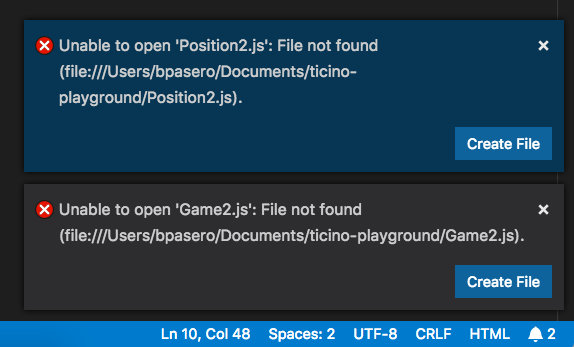
通知提示框從工作臺的右下角滑出。
一旦在通知中心開啟,它們將顯示在一個帶有標題的列表中
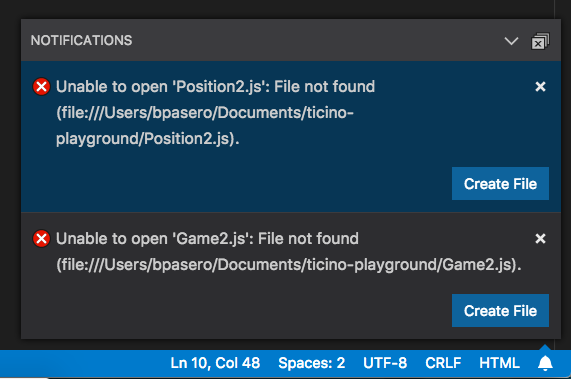
notificationCenter.border: 通知中心的邊框顏色。notificationCenterHeader.foreground: 通知中心標題的前景色。notificationCenterHeader.background: 通知中心標題的背景色。notificationToast.border: 通知提示框的邊框顏色。notifications.foreground: 通知的前景色。notifications.background: 通知的背景色。notifications.border: 通知中心中分隔通知的通知邊框顏色。notificationLink.foreground: 通知連結的前景色。notificationsErrorIcon.foreground: 用於通知錯誤圖示的顏色。notificationsWarningIcon.foreground: 用於通知警告圖示的顏色。notificationsInfoIcon.foreground: 用於通知資訊圖示的顏色。
橫幅顏色
橫幅出現在標題欄下方,並在可見時跨越整個工作臺寬度。
banner.background: 橫幅背景色。banner.foreground: 橫幅前景色。banner.iconForeground: 橫幅文字前面的圖示顏色。
擴充套件顏色
extensionButton.prominentForeground: 擴充套件檢視按鈕前景色 (例如安裝按鈕)。extensionButton.prominentBackground: 擴充套件檢視按鈕背景色。extensionButton.prominentHoverBackground: 擴充套件檢視按鈕懸停背景色。extensionButton.background: 擴充套件操作按鈕背景色。extensionButton.foreground: 擴充套件操作按鈕前景色。extensionButton.hoverBackground: 擴充套件操作按鈕懸停背景色。extensionButton.separator: 擴充套件操作按鈕分隔符顏色。extensionBadge.remoteBackground: 擴充套件檢視中遠端徽章的背景色。extensionBadge.remoteForeground: 擴充套件檢視中遠端徽章的前景色。extensionIcon.starForeground: 擴充套件評分的圖示顏色。extensionIcon.verifiedForeground: 擴充套件已驗證釋出者的圖示顏色。extensionIcon.preReleaseForeground: 預釋出擴充套件的圖示顏色。extensionIcon.sponsorForeground: 擴充套件贊助商的圖示顏色。extensionIcon.privateForeground: 私有擴充套件的圖示顏色。mcpIcon.starForeground: mcp 星星的圖示顏色。
快速選擇器顏色
pickerGroup.border: 快速選擇器(快速開啟)分組邊框的顏色。pickerGroup.foreground: 快速選擇器(快速開啟)分組標籤的顏色。quickInput.background: 快速輸入背景色。快速輸入小元件是顏色主題選擇器等檢視的容器。quickInput.foreground: 快速輸入前景色。快速輸入小元件是顏色主題選擇器等檢視的容器。quickInputList.focusBackground: 快速選擇器中焦點項的背景色。quickInputList.focusForeground: 快速選擇器中焦點項的前景色。quickInputList.focusIconForeground: 快速選擇器中焦點項的圖示前景色。quickInputTitle.background: 快速選擇器標題背景色。快速選擇器小元件是命令面板等選擇器的容器。
鍵繫結標籤顏色
當命令關聯了鍵繫結時,會顯示鍵繫結標籤。可以在命令面板中看到鍵繫結標籤的示例

鍵繫結標籤的使用包括(但不限於)
- 命令面板
- 鍵盤快捷方式編輯器
- 鍵盤快捷方式錄製器模式
- 擴充套件市場頁面的“功能貢獻”部分
以下自定義可用
keybindingLabel.background: 鍵繫結標籤背景色。鍵繫結標籤用於表示鍵盤快捷方式。keybindingLabel.foreground: 鍵繫結標籤前景色。鍵繫結標籤用於表示鍵盤快捷方式。keybindingLabel.border: 鍵繫結標籤邊框顏色。鍵繫結標籤用於表示鍵盤快捷方式。keybindingLabel.bottomBorder: 鍵繫結標籤底部邊框顏色。鍵繫結標籤用於表示鍵盤快捷方式。
鍵盤快捷方式表顏色
keybindingTable.headerBackground: 鍵盤快捷方式表頭的背景色。keybindingTable.rowsBackground: 鍵盤快捷方式表交替行的背景色。
整合終端顏色
-
terminal.background: 整合終端視口的背景色。 -
terminal.border: 終端內部分隔拆分窗格的邊框顏色。預設為 panel.border。 -
terminal.foreground: 整合終端的預設前景色。 -
terminal.ansiBlack: 終端中的“Black”ANSI 顏色。 -
terminal.ansiBlue: 終端中的“Blue”ANSI 顏色。 -
terminal.ansiBrightBlack: 終端中的“BrightBlack”ANSI 顏色。 -
terminal.ansiBrightBlue: 終端中的“BrightBlue”ANSI 顏色。 -
terminal.ansiBrightCyan: 終端中的“BrightCyan”ANSI 顏色。 -
terminal.ansiBrightGreen: 終端中的“BrightGreen”ANSI 顏色。 -
terminal.ansiBrightMagenta: 終端中的“BrightMagenta”ANSI 顏色。 -
terminal.ansiBrightRed: 終端中的“BrightRed”ANSI 顏色。 -
terminal.ansiBrightWhite: 終端中的“BrightWhite”ANSI 顏色。 -
terminal.ansiBrightYellow: 終端中的“BrightYellow”ANSI 顏色。 -
terminal.ansiCyan: 終端中的“Cyan”ANSI 顏色。 -
terminal.ansiGreen: 終端中的“Green”ANSI 顏色。 -
terminal.ansiMagenta: 終端中的“Magenta”ANSI 顏色。 -
terminal.ansiRed: 終端中的“Red”ANSI 顏色。 -
terminal.ansiWhite: 終端中的“White”ANSI 顏色。 -
terminal.ansiYellow: 終端中的“Yellow”ANSI 顏色。 -
terminal.selectionBackground: 終端的選擇背景色。 -
terminal.selectionForeground: 終端的選擇前景色。當此項為 null 時,將保留選擇前景色並應用最小對比度功能。 -
terminal.inactiveSelectionBackground: 終端失去焦點時的選擇背景色。 -
terminal.findMatchBackground: 終端中當前搜尋匹配的顏色。顏色不能不透明,以免隱藏底層終端內容。 -
terminal.findMatchBorder: 終端中當前搜尋匹配的邊框顏色。 -
terminal.findMatchHighlightBackground: 終端中其他搜尋匹配的顏色。顏色不能不透明,以免隱藏底層終端內容。 -
terminal.findMatchHighlightBorder: 終端中其他搜尋匹配的邊框顏色。 -
terminal.hoverHighlightBackground: 在終端中懸停連結時的突出顯示顏色。 -
terminalCursor.background: 終端游標的背景色。允許自定義被塊游標覆蓋的字元的顏色。 -
terminalCursor.foreground: 終端游標的前景色。 -
terminal.dropBackground: 拖動到終端上方的背景色。顏色應具有透明度,以便終端內容仍然可以透射。 -
terminal.tab.activeBorder: 面板中終端選項卡側面的邊框。預設為tab.activeBorder。 -
terminalCommandDecoration.defaultBackground: 預設終端命令裝飾背景色。 -
terminalCommandDecoration.successBackground: 成功命令的終端命令裝飾背景色。 -
terminalCommandDecoration.errorBackground: 錯誤命令的終端命令裝飾背景色。 -
terminalOverviewRuler.cursorForeground: 概覽尺標游標顏色。 -
terminalOverviewRuler.findMatchForeground: 終端中查詢匹配項的概覽尺標標記顏色。 -
terminalStickyScroll.background: 終端中粘性滾動覆蓋層的背景色。 -
terminalStickyScroll.border: 終端中粘性滾動覆蓋層的邊框。 -
terminalStickyScrollHover.background: 懸停在終端中粘性滾動覆蓋層時的背景色。 -
terminal.initialHintForeground: 終端初始提示的前景色。 -
terminalOverviewRuler.border: 概覽尺標左側邊框顏色。 -
terminalCommandGuide.foreground: 終端命令指南的前景色,該指南在懸停時出現在命令及其輸出的左側。 -
terminalSymbolIcon.aliasForeground: 別名圖示的前景色。這些圖示將出現在終端建議小元件中 -
terminalSymbolIcon.branchForeground: 分支圖示的前景色。這些圖示將出現在終端建議小元件中。 -
terminalSymbolIcon.commitForeground: 提交圖示的前景色。這些圖示將出現在終端建議小元件中。 -
terminalSymbolIcon.flagForeground: 標誌圖示的前景色。這些圖示將出現在終端建議小元件中 -
terminalSymbolIcon.optionForeground: 選項圖示的前景色。這些圖示將出現在終端建議小元件中。 -
terminalSymbolIcon.optionValueForeground: 列舉成員圖示的前景色。這些圖示將出現在終端建議小元件中。 -
terminalSymbolIcon.methodForeground: 方法圖示的前景色。這些圖示將出現在終端建議小元件中。 -
terminalSymbolIcon.argumentForeground: 引數圖示的前景色。這些圖示將出現在終端建議小元件中。 -
terminalSymbolIcon.inlineSuggestionForeground: 內聯建議圖示的前景色。這些圖示將出現在終端建議小元件中。 -
terminalSymbolIcon.fileForeground: 檔案圖示的前景色。這些圖示將出現在終端建議小元件中。 -
terminalSymbolIcon.folderForeground: 資料夾圖示的前景色。這些圖示將出現在終端建議小元件中。 -
terminalSymbolIcon.pullRequestDoneForeground: 已完成拉取請求圖示的前景色。這些圖示將出現在終端建議小元件中。 -
terminalSymbolIcon.pullRequestForeground: 拉取請求圖示的前景色。這些圖示將出現在終端建議小元件中。 -
terminalSymbolIcon.remoteForeground: 遠端圖示的前景色。這些圖示將出現在終端建議小元件中。 -
terminalSymbolIcon.stashForeground: 暫存圖示的前景色。這些圖示將出現在終端建議小元件中。 -
terminalSymbolIcon.symbolText: 純文字建議的前景色。這些圖示將出現在終端建議小元件中。 -
terminalSymbolIcon.symbolicLinkFileForeground: 符號連結檔案圖示的前景色。這些圖示將出現在終端建議小元件中。 -
terminalSymbolIcon.symbolicLinkFolderForeground: 符號連結資料夾圖示的前景色。這些圖示將出現在終端建議小元件中。 -
terminalSymbolIcon.tagForeground: 標籤圖示的前景色。這些圖示將出現在終端建議小元件中。
除錯顏色
debugToolBar.background: 除錯工具欄背景色。debugToolBar.border: 除錯工具欄邊框顏色。editor.stackFrameHighlightBackground: 編輯器中頂部堆疊幀突出顯示的背景色。editor.focusedStackFrameHighlightBackground: 編輯器中焦點堆疊幀突出顯示的背景色。editor.inlineValuesForeground: 除錯內聯值文字的顏色。editor.inlineValuesBackground: 除錯內聯值背景的顏色。debugView.exceptionLabelForeground: 當偵錯程式在異常處中斷時,呼叫堆疊檢視中顯示的標籤的前景色。debugView.exceptionLabelBackground: 當偵錯程式在異常處中斷時,呼叫堆疊檢視中顯示的標籤的背景色。debugView.stateLabelForeground: 呼叫堆疊檢視中顯示當前會話或執行緒狀態的標籤的前景色。debugView.stateLabelBackground: 呼叫堆疊檢視中顯示當前會話或執行緒狀態的標籤的背景色。debugView.valueChangedHighlight: 用於突出顯示除錯檢視(例如變數檢視)中值更改的顏色。debugTokenExpression.name: 除錯檢視(例如變數或監視檢視)中顯示的令牌名稱的前景色。debugTokenExpression.value: 除錯檢視中顯示的令牌值的前景色。debugTokenExpression.string: 除錯檢視中字串的前景色。debugTokenExpression.boolean: 除錯檢視中布林值的前景色。debugTokenExpression.number: 除錯檢視中數字的前景色。debugTokenExpression.error: 除錯檢視中表達式錯誤的前景色。debugTokenExpression.type: 除錯檢視(即變數或監視檢視)中顯示的令牌型別的前景色。
測試顏色
testing.runAction: 編輯器中“執行”圖示的顏色。testing.iconErrored: 測試資源管理器中“出錯”圖示的顏色。testing.iconFailed: 測試資源管理器中“失敗”圖示的顏色。testing.iconPassed: 測試資源管理器中“透過”圖示的顏色。testing.iconQueued: 測試資源管理器中“排隊”圖示的顏色。testing.iconUnset: 測試資源管理器中“未設定”圖示的顏色。testing.iconSkipped: 測試資源管理器中“跳過”圖示的顏色。testing.iconErrored.retired: 測試資源管理器中“出錯”圖示的已停用顏色。testing.iconFailed.retired: 測試資源管理器中“失敗”圖示的已停用顏色。testing.iconPassed.retired: 測試資源管理器中“透過”圖示的已停用顏色。testing.iconQueued.retired: 測試資源管理器中“排隊”圖示的已停用顏色。testing.iconUnset.retired: 測試資源管理器中“未設定”圖示的已停用顏色。testing.iconSkipped.retired: 測試資源管理器中“跳過”圖示的已停用顏色。testing.peekBorder: 窺視檢視邊框和箭頭的顏色。testing.peekHeaderBackground: 窺視檢視邊框和箭頭的顏色。testing.message.error.lineBackground: 編輯器中內聯顯示的錯誤訊息旁邊的邊距顏色。testing.message.info.decorationForeground: 編輯器中內聯顯示的測試資訊訊息的文字顏色。testing.message.info.lineBackground: 編輯器中內聯顯示的資訊訊息旁邊的邊距顏色。testing.messagePeekBorder: 窺視記錄的訊息時,窺視檢視邊框和箭頭的顏色。testing.messagePeekHeaderBackground: 窺視記錄的訊息時,窺視檢視邊框和箭頭的顏色。testing.coveredBackground: 已覆蓋文字的背景色。testing.coveredBorder: 已覆蓋文字的邊框顏色。testing.coveredGutterBackground: 程式碼已覆蓋區域的裝訂線顏色。testing.uncoveredBranchBackground: 顯示未覆蓋分支的小元件背景。testing.uncoveredBackground: 未覆蓋文字的背景色。testing.uncoveredBorder: 未覆蓋文字的邊框顏色。testing.uncoveredGutterBackground: 程式碼未覆蓋區域的裝訂線顏色。testing.coverCountBadgeBackground: 指示執行次數的徽章背景。testing.coverCountBadgeForeground: 指示執行次數的徽章前景色。testing.message.error.badgeBackground: 編輯器中內聯顯示的測試錯誤訊息徽章背景色。testing.message.error.badgeBorder: 編輯器中內聯顯示的測試錯誤訊息徽章邊框顏色。testing.message.error.badgeForeground: 編輯器中內聯顯示的測試錯誤訊息文字顏色。
歡迎頁顏色
-
welcomePage.background: 歡迎頁面的背景色。 -
welcomePage.progress.background: 歡迎頁面進度條的前景色。 -
welcomePage.progress.foreground: 歡迎頁面進度條的背景色。 -
welcomePage.tileBackground: 歡迎頁面上磁貼的背景色。 -
welcomePage.tileHoverBackground: 歡迎頁面上磁貼的懸停背景色。 -
welcomePage.tileBorder: 歡迎頁面上磁貼的邊框顏色。 -
walkThrough.embeddedEditorBackground: 互動式演練中嵌入式編輯器的背景色。 -
walkthrough.stepTitle.foreground: 每個演練步驟標題的前景色。
Git 顏色
gitDecoration.addedResourceForeground: 新增的 Git 資源顏色。用於檔案標籤和 SCM 檢視。gitDecoration.modifiedResourceForeground: 修改的 Git 資源顏色。用於檔案標籤和 SCM 檢視。gitDecoration.deletedResourceForeground: 刪除的 Git 資源顏色。用於檔案標籤和 SCM 檢視。gitDecoration.renamedResourceForeground: 重新命名或複製的 Git 資源顏色。用於檔案標籤和 SCM 檢視。gitDecoration.stageModifiedResourceForeground: 暫存修改的 Git 裝飾顏色。用於檔案標籤和 SCM 檢視。gitDecoration.stageDeletedResourceForeground: 暫存刪除的 Git 裝飾顏色。用於檔案標籤和 SCM 檢視。gitDecoration.untrackedResourceForeground: 未跟蹤的 Git 資源顏色。用於檔案標籤和 SCM 檢視。gitDecoration.ignoredResourceForeground: 忽略的 Git 資源顏色。用於檔案標籤和 SCM 檢視。gitDecoration.conflictingResourceForeground: 衝突的 Git 資源顏色。用於檔案標籤和 SCM 檢視。gitDecoration.submoduleResourceForeground: 子模組資源顏色。git.blame.editorDecorationForeground: 責備編輯器裝飾的顏色。
原始碼管理圖顏色
scmGraph.historyItemHoverLabelForeground: 歷史項懸停標籤前景色。scmGraph.foreground1: 原始碼管理圖前景色 (1)。scmGraph.foreground2: 原始碼管理圖前景色 (2)。scmGraph.foreground3: 原始碼管理圖前景色 (3)。scmGraph.foreground4: 原始碼管理圖前景色 (4)。scmGraph.foreground5: 原始碼管理圖前景色 (5)。scmGraph.historyItemHoverAdditionsForeground: 歷史項懸停新增前景色。scmGraph.historyItemHoverDeletionsForeground: 歷史項懸停刪除前景色。scmGraph.historyItemRefColor: 歷史項引用顏色。scmGraph.historyItemRemoteRefColor: 歷史項遠端引用顏色。scmGraph.historyItemBaseRefColor: 歷史項基本引用顏色。scmGraph.historyItemHoverDefaultLabelForeground: 歷史項懸停預設標籤前景色。scmGraph.historyItemHoverDefaultLabelBackground: 歷史項懸停預設標籤背景色。
設定編輯器顏色
注意:這些顏色用於 GUI 設定編輯器,可以透過 Preferences: Open Settings (UI) 命令開啟。
settings.headerForeground: 節標題或活動標題的前景色。settings.modifiedItemIndicator: 指示已修改設定的行。settings.dropdownBackground: 下拉框背景。settings.dropdownForeground: 下拉框前景色。settings.dropdownBorder: 下拉框邊框。settings.dropdownListBorder: 下拉列表邊框。settings.checkboxBackground: 複選框背景。settings.checkboxForeground: 複選框前景色。settings.checkboxBorder: 複選框邊框。settings.rowHoverBackground: 懸停設定行時的背景色。settings.textInputBackground: 文字輸入框背景。settings.textInputForeground: 文字輸入框前景色。settings.textInputBorder: 文字輸入框邊框。settings.numberInputBackground: 數字輸入框背景。settings.numberInputForeground: 數字輸入框前景色。settings.numberInputBorder: 數字輸入框邊框。settings.focusedRowBackground: 焦點設定行的背景色。settings.focusedRowBorder: 行獲得焦點時,行頂部和底部邊框的顏色。settings.headerBorder: 標題容器邊框的顏色。settings.sashBorder: 設定編輯器拆分檢視的窗格邊框顏色。settings.settingsHeaderHoverForeground: 節標題或懸停標題的前景色。
麵包屑顏色
麵包屑導航的主題顏色
breadcrumb.foreground: 麵包屑項的顏色。breadcrumb.background: 麵包屑項的背景色。breadcrumb.focusForeground: 焦點麵包屑項的顏色。breadcrumb.activeSelectionForeground: 選定麵包屑項的顏色。breadcrumbPicker.background: 麵包屑項選擇器的背景色。
片段顏色
片段的主題顏色
editor.snippetTabstopHighlightBackground: 片段製表位的突出顯示背景色。editor.snippetTabstopHighlightBorder: 片段製表位的突出顯示邊框顏色。editor.snippetFinalTabstopHighlightBackground: 片段最終制表位的突出顯示背景色。editor.snippetFinalTabstopHighlightBorder: 片段最終制表位的突出顯示邊框顏色。
符號圖示顏色
大綱檢視、麵包屑導航和建議小元件中顯示的符號圖示的主題顏色
symbolIcon.arrayForeground: 陣列符號的前景色。symbolIcon.booleanForeground: 布林值符號的前景色。symbolIcon.classForeground: 類符號的前景色。symbolIcon.colorForeground: 顏色符號的前景色。symbolIcon.constantForeground: 常量符號的前景色。symbolIcon.constructorForeground: 建構函式符號的前景色。symbolIcon.enumeratorForeground: 列舉器符號的前景色。symbolIcon.enumeratorMemberForeground: 列舉器成員符號的前景色。symbolIcon.eventForeground: 事件符號的前景色。symbolIcon.fieldForeground: 欄位符號的前景色。symbolIcon.fileForeground: 檔案符號的前景色。symbolIcon.folderForeground: 資料夾符號的前景色。symbolIcon.functionForeground: 函式符號的前景色。symbolIcon.interfaceForeground: 介面符號的前景色。symbolIcon.keyForeground: 鍵符號的前景色。symbolIcon.keywordForeground: 關鍵字元號的前景色。symbolIcon.methodForeground: 方法符號的前景色。symbolIcon.moduleForeground: 模組符號的前景色。symbolIcon.namespaceForeground: 名稱空間符號的前景色。symbolIcon.nullForeground: null 符號的前景色。symbolIcon.numberForeground: 數字符號的前景色。symbolIcon.objectForeground: 物件符號的前景色。symbolIcon.operatorForeground: 運算子符號的前景色。symbolIcon.packageForeground: 包符號的前景色。symbolIcon.propertyForeground: 屬性符號的前景色。symbolIcon.referenceForeground: 引用符號的前景色。symbolIcon.snippetForeground: 片段符號的前景色。symbolIcon.stringForeground: 字串符號的前景色。symbolIcon.structForeground: 結構體符號的前景色。symbolIcon.textForeground: 文字符號的前景色。symbolIcon.typeParameterForeground: 型別引數符號的前景色。symbolIcon.unitForeground: 單位符號的前景色。symbolIcon.variableForeground: 變數符號的前景色。
除錯圖示顏色
-
debugIcon.breakpointForeground: 斷點圖示顏色。 -
debugIcon.breakpointDisabledForeground: 停用斷點圖示顏色。 -
debugIcon.breakpointUnverifiedForeground: 未驗證斷點圖示顏色。 -
debugIcon.breakpointCurrentStackframeForeground: 當前斷點堆疊幀圖示顏色。 -
debugIcon.breakpointStackframeForeground: 所有斷點堆疊幀圖示顏色。 -
debugIcon.startForeground: 開始除錯的除錯工具欄圖示。 -
debugIcon.pauseForeground: 暫停的除錯工具欄圖示。 -
debugIcon.stopForeground: 停止的除錯工具欄圖示。 -
debugIcon.disconnectForeground: 斷開連線的除錯工具欄圖示。 -
debugIcon.restartForeground: 重啟的除錯工具欄圖示。 -
debugIcon.stepOverForeground: 跳過的除錯工具欄圖示。 -
debugIcon.stepIntoForeground: 步入的除錯工具欄圖示。 -
debugIcon.stepOutForeground: 跳出的除錯工具欄圖示。 -
debugIcon.continueForeground: 繼續的除錯工具欄圖示。 -
debugIcon.stepBackForeground: 退回的除錯工具欄圖示。 -
debugConsole.infoForeground: 除錯 REPL 控制檯中資訊訊息的前景色。 -
debugConsole.warningForeground: 除錯 REPL 控制檯中警告訊息的前景色。 -
debugConsole.errorForeground: 除錯 REPL 控制檯中錯誤訊息的前景色。 -
debugConsole.sourceForeground: 除錯 REPL 控制檯中原始檔名的前景色。 -
debugConsoleInputIcon.foreground: 除錯控制檯輸入標記圖示的前景色。
筆記本顏色
notebook.editorBackground: 筆記本背景色。notebook.cellBorderColor: 筆記本單元格的邊框顏色。notebook.cellHoverBackground: 懸停單元格時的背景色。notebook.cellInsertionIndicator: 筆記本單元格插入指示器的顏色。notebook.cellStatusBarItemHoverBackground: 筆記本單元格狀態列項的背景色。notebook.cellToolbarSeparator: 單元格底部工具欄中分隔符的顏色notebook.cellEditorBackground: 筆記本單元格編輯器背景色notebook.focusedCellBackground: 單元格獲得焦點時的背景色。notebook.focusedCellBorder: 單元格獲得焦點時,單元格焦點指示器邊框的顏色。notebook.focusedEditorBorder: 筆記本單元格編輯器邊框的顏色。notebook.inactiveFocusedCellBorder: 當單元格獲得焦點而主要焦點不在編輯器外部時,單元格頂部和底部邊框的顏色。notebook.inactiveSelectedCellBorder: 多個單元格被選中時,單元格邊框的顏色。notebook.outputContainerBackgroundColor: 筆記本輸出容器的背景色。notebook.outputContainerBorderColor: 筆記本輸出容器的邊框顏色。notebook.selectedCellBackground: 單元格被選中時的背景色。notebook.selectedCellBorder: 單元格被選中但未獲得焦點時,單元格頂部和底部邊框的顏色。notebook.symbolHighlightBackground: 突出顯示單元格的背景色notebookScrollbarSlider.activeBackground: 單擊時筆記本捲軸滑塊背景色。notebookScrollbarSlider.background: 筆記本捲軸滑塊背景色。notebookScrollbarSlider.hoverBackground: 懸停時筆記本捲軸滑塊背景色。notebookStatusErrorIcon.foreground: 單元格狀態列中筆記本單元格的錯誤圖示顏色。notebookStatusRunningIcon.foreground: 單元格狀態列中筆記本單元格的執行圖示顏色。notebookStatusSuccessIcon.foreground: 單元格狀態列中筆記本單元格的成功圖示顏色。notebookEditorOverviewRuler.runningCellForeground: 筆記本編輯器概覽尺標中執行單元格裝飾的顏色。
圖表顏色
charts.foreground: 圖表中文字的對比色。charts.lines: 圖表中的線條顏色。charts.red: 圖表中紅色元素的顏色。charts.blue: 圖表中藍色元素的顏色。charts.yellow: 圖表中黃色元素的顏色。charts.orange: 圖表中橙色元素的顏色。charts.green: 圖表中綠色元素的顏色。charts.purple: 圖表中紫色元素的顏色。chart.line: 圖表的線條顏色。chart.axis: 圖表的軸顏色。chart.guide: 圖表的輔助線。
埠顏色
ports.iconRunningProcessForeground: 具有關聯執行程序的埠圖示顏色。
評論檢視顏色
commentsView.resolvedIcon: 已解決評論的圖示顏色。commentsView.unresolvedIcon: 未解決評論的圖示顏色。
操作欄顏色
actionBar.toggledBackground: 操作欄中切換操作項的背景色。
簡單查詢小元件顏色
simpleFindWidget.sashBorder: 窗格邊框的顏色。
儀表顏色
gauge.background: 儀表背景色。gauge.foreground: 儀表前景色。gauge.border: 儀表邊框顏色。gauge.warningBackground: 儀表警告背景色。gauge.warningForeground: 儀表警告前景色。gauge.errorBackground: 儀表錯誤背景色。gauge.errorForeground: 儀表錯誤前景色。
Markdown
markdownAlert.note.foreground: Markdown 中註釋警報的前景色。markdownAlert.tip.foreground: Markdown 中提示警報的前景色。markdownAlert.important.foreground: Markdown 中重要警報的前景色。markdownAlert.warning.foreground: Markdown 中警告警報的前景色。markdownAlert.caution.foreground: Markdown 中謹慎警報的前景色。
擴充套件顏色
顏色 ID 也可以透過 顏色貢獻點 由擴充套件提供。這些顏色在使用 workbench.colorCustomizations 設定和顏色主題定義檔案中的程式碼完成時也會出現。使用者可以在擴充套件貢獻選項卡中檢視擴充套件定義的顏色。